Physical Address
304 North Cardinal St.
Dorchester Center, MA 02124
Physical Address
304 North Cardinal St.
Dorchester Center, MA 02124

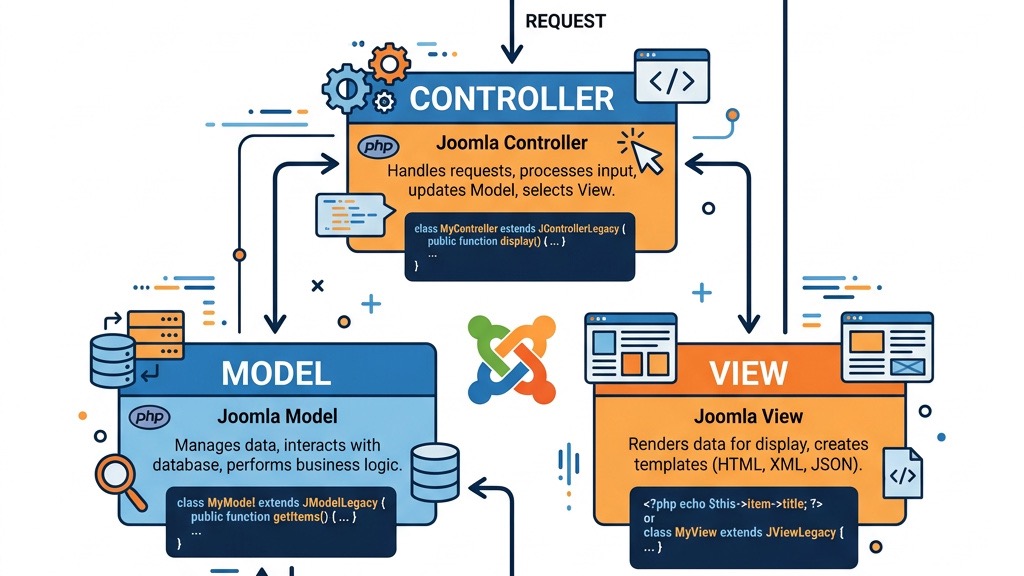


When we first explored the Joomla ecosystem, we quickly realized that the platform’s success rests on a clear separation of concerns. The Model‑View‑Controller (MVC) pattern gives us a disciplined way to organize code, keep business logic out of presentation files, and make extensions easier to test and maintain. In an MVC setup, the Model handles data retrieval and manipulation, the View prepares the HTML (or JSON, XML, etc.) that the browser receives, and the Controller interprets user actions and decides which Model and View to invoke.
Joomla adopted MVC early on because it mirrors the way modern web applications operate. Procedural scripts that mix SQL queries, HTML markup, and request handling become tangled as projects grow. By isolating each responsibility, developers can work on the data layer without worrying about layout, or tweak a template without breaking database interactions. This discipline also aligns Joomla with other PHP frameworks, making it easier for developers familiar with Laravel or Symfony to transition.
The pattern is not a new invention for Joomla; it is an evolution of the CMS’s original architecture. If you are new to the platform, the article What Is Joomla offers a solid overview of the system’s purpose and community. Likewise, the broader Joomla CMS page explains how the core, extensions, and templates fit together under the same architectural umbrella. Understanding why Joomla embraces MVC helps us appreciate the benefits of clean code, easier debugging, and smoother upgrades—especially as we move from Joomla 3 to Joomla 4 and beyond.
In this section we break down the three core components that make up the joomla mvc architecture. Each pillar plays a distinct role, yet they collaborate tightly through Joomla’s service container and event system. By mastering the Model, View, and Controller, we can build extensions that behave predictably across the front‑end and back‑end, respect routing rules, and integrate with Joomla’s built‑in security features.
The Model is the backbone of any Joomla component. It encapsulates all interactions with the database, providing a clean API for the Controller and View to consume. Joomla ships with several base model classes that we can extend:
getDbo() and getTable().getItems() and getTotal().A typical model overrides getListQuery() to define the SQL used for a list view. Below is a concise example that fetches published articles from the #__content table:
<?php
defined('_JEXEC') or die;

use Joomla\CMS\MVC\Model\ListModel;

class ContentModelArticles extends ListModel
{
    protected function getListQuery()
    {
        $db    = $this->getDbo();
        $query = $db->getQuery(true)
            ->select('a.id, a.title, a.introtext, a.created')
            ->from($db->quoteName('#__content', 'a'))
            ->where($db->quoteName('a.state') . ' = 1')
            ->order('a.created DESC');

        return $query;
    }
}
When the Controller calls $model->getItems(), Joomla automatically executes the query returned by getListQuery() and returns an array of objects. For single‑record access, we implement getItem($pk = null), which typically uses $this->getTable() to load a row by primary key. The Model also respects Joomla’s ACL system, allowing us to filter results based on the current user’s permissions.
Because the Model never touches HTML, we can reuse it across different Views—HTML, JSON, or CSV—without duplication. This reusability is a cornerstone of the joomla mvc architecture, enabling us to keep business rules in one place while presenting data in many formats.
The View translates data supplied by the Model into a format that the browser can render. In Joomla, a View class extends HtmlView (or JsonView, XmlView, etc.) and primarily defines a display($tpl = null) method. This method fetches the Model, assigns data to the template, and loads a .php layout file from the tmpl folder.
Consider the following View class that renders the article list from the previous Model:
<?php
defined('_JEXEC') or die;

use Joomla\CMS\MVC\View\HtmlView;

class ContentViewArticles extends HtmlView
{
    protected $items;
    protected $pagination;

    public function display($tpl = null)
    {
        $model          = $this->getModel();
        $this->items    = $model->getItems();
        $this->pagination = $model->getPagination();

        // Load the template file
        parent::display($tpl);
    }
}
The corresponding layout file tmpl/default.php might look like this:
<?php
defined('_JEXEC') or die;
?>
<h2>Latest Articles</h2>
<ul class="article-list">
    <?php foreach ($this->items as $item) : ?>
        <li>
            <a href="<?php echo JRoute::_('index.php?option=com_content&view=article&id=' . $item->id); ?>">
                <?php echo $this->escape($item->title); ?>
            </a>
            <p><?php echo $this->escape($item->introtext); ?></p>
        </li>
    <?php endforeach; ?>
</ul>

<?php echo $this->pagination->getListLinks(); ?>
Notice how the View never performs a database query; it relies entirely on the Model. This separation makes it simple to swap the layout for a different design or to create a JSON view for an API endpoint. The View also benefits from Joomla’s built‑in HTML helpers, such as JRoute::_() for routing and $this->escape() for XSS protection.
When we need to customize the output without altering core component files, we can place an override in our template folder. The guide on Joomla template overrides explains how to create an override that lives in templates/your_template/html/com_content/articles/default.php, preserving our changes across core updates.
The Controller is the entry point for every HTTP request that targets a component. Joomla’s base controller, BaseController, parses the task parameter, loads the appropriate Model, and calls the corresponding method. Controllers also handle form submissions, token verification, and redirects.
Below is a minimal Controller that processes a “publish” task for an article:
<?php
defined('_JEXEC') or die;

use Joomla\CMS\MVC\Controller\BaseController;
use Joomla\CMS\Router\Route;
use Joomla\CMS\Session\Session;

class ContentControllerArticle extends BaseController
{
    public function publish()
    {
        // Verify the CSRF token
        Session::checkToken() or jexit('Invalid Token');

        $id = $this->input->getInt('id');
        $model = $this->getModel('Article');

        if ($model->publish($id)) {
            $this->setMessage('Article published successfully.');
        } else {
            $this->setError('Unable to publish article.');
        }

        $this->setRedirect(Route::_('index.php?option=com_content&view=articles', false));
    }
}
When a user clicks a “Publish” button, the form includes a hidden task=article.publish field. Joomla’s routing system reads this value, instantiates ContentControllerArticle, and invokes the publish() method. The method first checks the CSRF token using Session::checkToken(), then delegates the actual state change to the Model’s publish($id) method.
Controllers also manage access control. By calling $user->authorise('core.edit.state', 'com_content') we can ensure that only authorized users can trigger the task. For backend components, the same pattern applies, but the controller often extends AdminController to gain additional helper methods for batch processing.
If you need to explore the Joomla administration interface, the article on the Joomla admin panel provides a useful overview of how controllers interact with menus, toolbars, and the backend UI.
Understanding the file layout of a Joomla component is essential for navigating the joomla mvc architecture. A typical component resides in administrator/components/com_example for the backend and components/com_example for the frontend. Each side contains subfolders for controller, model, view, tables, and helpers. Joomla 4 introduced a service‑provider pattern that registers classes in src/Provider and encourages the use of PSR‑4 autoloading.
com_example/
├─ admin/
│  ├─ controller/
│  │  └─ Article.php
│  ├─ model/
│  │  └─ Article.php
│  ├─ view/
│  │  └─ article/
│  │     ├─ tmpl/
│  │     │  └─ default.php
│  │     └─ view.html.php
│  ├─ tables/
│  │  └─ article.php
│  └─ Example.php
├─ site/
│  ├─ controller/
│  │  └─ Articles.php
│  ├─ model/
│  │  └─ Articles.php
│  ├─ view/
│  │  └─ articles/
│  │     ├─ tmpl/
│  │     │  └─ default.php
│  │     └─ view.html.php
│  └─ Example.php
└─ manifest.xml
The manifest.xml file declares the component’s files, languages, and installation scripts. When we upload a zip package via the how to install Joomla extensions page, Joomla parses this manifest and places files in the appropriate directories.
Permissions matter: the administrator folder must be writable during installation but should be locked down afterward. The guide on Joomla file permissions outlines the recommended settings for 755 directories and 644 files, preventing unauthorized modifications while allowing the web server to read the component.
In Joomla 4 and Joomla 5, the src folder often replaces the older controller, model, and view directories, but the underlying MVC concepts remain unchanged. Keeping a clear separation between frontend and backend code helps us maintain a tidy codebase and reduces the risk of accidental exposure of admin functionality.
When a visitor requests a URL that points to a Joomla component, the platform follows a well‑defined pipeline. Understanding this flow lets us debug issues quickly and design extensions that respect Joomla’s routing and SEO features.
index.php?option=com_content&view=article&id=42 maps to the Content component, Article view, and no explicit task. The router also applies the rules from the SEO-friendly URLs in Joomla guide, converting human‑readable paths into query strings.JApplicationCms object loads the configuration, language files, and plugins. At this stage, the system fires the onAfterInitialise event, allowing plugins to modify the request.components/com_content/content.php). The entry point creates a controller instance based on the task parameter. If no task is supplied, the default display method is called.display task, the controller typically invokes $this->getView('Article', 'html').getListQuery() or getItem() to retrieve records from the database, applying any filters or ordering defined by the developer.tmpl folder, populates it with data, and returns the generated HTML. If an override exists in the active template, Joomla uses that file instead, preserving customizations.onAfterRender event, and logs performance metrics.Throughout this process, Joomla’s service container resolves dependencies, such as the database connection or the language object. The joomla mvc architecture ensures that each step remains isolated, making it easier to swap out components or add new features without breaking the whole system.
If you want a deeper dive into Joomla 4’s routing changes, the Joomla 4 tutorial walks through the new routing classes and how they affect component URLs.
While the classic MVC trio covers most scenarios, Joomla introduces a fourth class type—Table—to bridge the gap between raw database rows and object‑oriented code. Table classes extend JTable and map directly to a database table, providing methods such as load($pk), store(), and delete($pk).
A simple Table class for the #__example_items table might look like this:
<?php
defined('_JEXEC') or die;

use Joomla\CMS\Table\Table;

class ExampleTableItem extends Table
{
    public function __construct(&$db)
    {
        parent::__construct('#__example_items', 'id', $db);
    }

    // Optional: custom bind logic
    public function bind($array, $ignore = '')
    {
        // Ensure the title is trimmed
        if (isset($array['title'])) {
            $array['title'] = trim($array['title']);
        }

        return parent::bind($array, $ignore);
    }
}
In a Model, we can retrieve a Table instance via $this->getTable('Item'). The Model then calls $table->load($id) to fetch a row, manipulates the data, and finally invokes $table->store() to write changes back to the database. This pattern keeps SQL statements out of the Model’s business logic, allowing us to focus on validation and data transformation.
Table classes also support Joomla’s ACL checks, enabling us to enforce permissions at the row level. By centralizing data access in Table objects, we reduce duplication across components and make unit testing simpler.
One of Joomla’s most powerful features is the ability to override component output without modifying core files. Overrides sit in the active template’s html folder and mirror the component’s view path. For example, to change the article layout, we create templates/your_template/html/com_content/article/default.php.
When Joomla renders a view, it first looks for an override file. If it finds one, it loads the override; otherwise, it falls back to the component’s original layout. This mechanism respects the MVC boundary: the View class remains unchanged, while the presentation layer can be customized independently.
Overrides are especially useful when we need to adapt the markup to a new CSS framework or add micro‑data for SEO. Because the override lives outside the component, future updates to the component will not overwrite our changes. The guide on Joomla template overrides provides step‑by‑step instructions for creating and testing overrides.
Creating a minimal component helps us internal the joomla mvc architecture in practice. The skeleton consists of:
manifest.xml – declares the component and its files.site/controller/default.php – the front‑end controller.site/model/default.php – the model that fetches data.site/view/default/view.html.php and tmpl/default.php – the view and layout.admin/ equivalents for the backend.The official tutorial “Developing an MVC Component” walks through each file, showing how to register the component, load language strings, and handle tasks. By following that guide, we can create a functional “Hello World” component in under an hour, then extend it with additional models, tables, and overrides.
| Mistake | Why It Hurts | Better Approach |
|---|---|---|
| Mixing SQL directly in the View | Breaks separation of concerns; makes testing hard | Keep all queries in the Model or Table classes |
| Ignoring CSRF token checks in Controllers | Opens security holes | Always call `Session::checkToken()` before processing POST data |
| Overriding core component files instead of using template overrides | Updates will erase custom code | Create overrides in `templates/your_template/html/…` |
| Using global `$app` or `$db` variables inside Models | Reduces portability and testability | Use `$this->getDbo()` and `$this->getApplication()` methods provided by the base model |
By avoiding these pitfalls, we keep our extensions maintainable and aligned with Joomla’s design principles.
When we compare Joomla’s MVC to Laravel’s, we notice that Laravel emphasizes convention over configuration, with expressive Eloquent models and Blade templates. Joomla, on the other hand, relies on its own Table classes and layout files, which are less opinionated but tightly integrated with the CMS’s event system.
WordPress follows a hook‑based architecture rather than strict MVC. Plugins attach functions to actions and filters, which can lead to scattered logic. Joomla’s MVC encourages a more organized codebase, where each component owns its Model, View, and Controller, making large projects easier to navigate.
Both Laravel and Joomla benefit from Composer autoloading, but Joomla’s legacy code still supports the older class‑prefix system. Understanding these differences helps us decide when to reuse existing Joomla components or when to build a standalone service using a different framework.
1. What does “joomla mvc architecture” mean for a new developer?
It refers to the pattern where data handling (Model), presentation (View), and request processing (Controller) are separated into distinct classes. This structure makes code easier to read, test, and extend.
2. Do I need to use all three layers for a simple module?
While a module can output HTML directly, using at least a Model for data retrieval is recommended. The MVC pattern scales well, so starting with a full structure avoids refactoring later.
3. How does Joomla handle routing for MVC components?
Joomla’s router parses the URL, determines the component, view, and task, then dispatches the request to the appropriate Controller. SEO‑friendly URLs are generated based on routing rules defined in the component’s router.php file.
4. Can I reuse a Model across different Views?
Yes. Because the Model returns plain data objects, the same Model can feed an HTML view, a JSON view for an API, or even a CSV export view without modification.
5. Where should I place custom PHP code that does not belong to a component?
For reusable logic, create a library in libraries/yourname and load it via Composer or Joomla’s autoloader. This keeps the component directory clean and respects the MVC boundaries.
Mastering the joomla mvc architecture empowers us to build extensions that are clean, secure, and future‑proof. By respecting the separation of Model, View, and Controller, using Table classes, and using template overrides, we can deliver rich functionality while keeping the codebase maintainable. As Joomla continues to evolve, the core principles of MVC remain a solid foundation for any developer looking to contribute to the Joomla ecosystem.