Physical Address
304 North Cardinal St.
Dorchester Center, MA 02124
Physical Address
304 North Cardinal St.
Dorchester Center, MA 02124

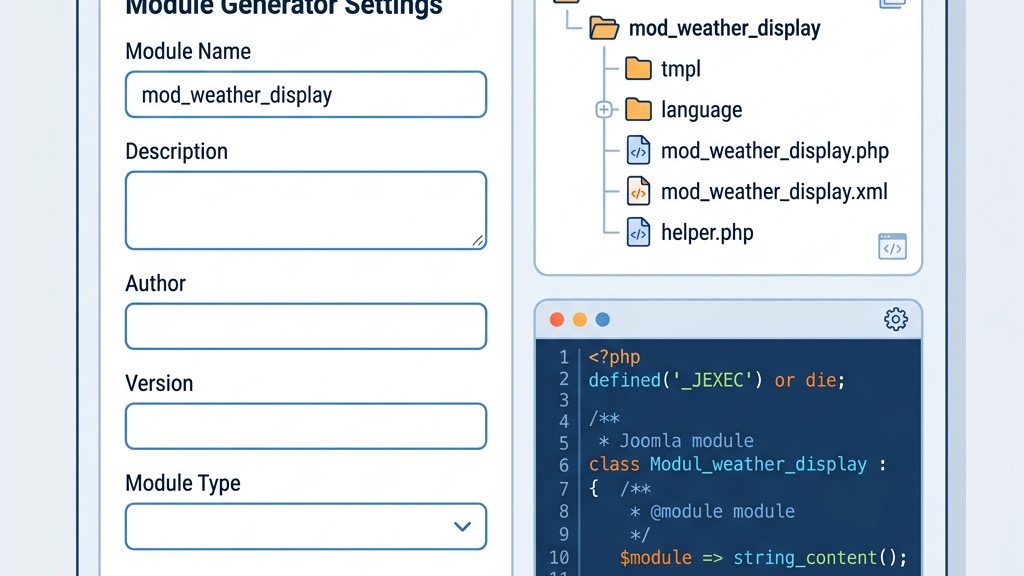


A Joomla module generator is a tool that produces the basic files and folder structure required for a new module with a single click or command. It takes a few inputs—module name, version, author, and a few optional settings—and spits out a ready‑to‑install package that follows Joomla’s coding conventions. By automating the repetitive parts of module creation, these generators let developers focus on the unique functionality that makes their module valuable.
Generators are especially useful for teams that need to produce multiple modules quickly, or for newcomers who want a clear starting point without having to remember every XML tag and PHP class signature. They also enforce a consistent layout, which reduces the risk of missing essential files like language packs or template folders.
It’s important to distinguish generators from building a module from scratch. While generators scaffold the structure, manual coding is still required to implement the business logic, UI, and any custom integrations. Think of a generator as a first‑draft outline that you later flesh out with your own code.
Using a generator offers several tangible benefits:
However, there are scenarios where hand‑coding is still advantageous. Complex custom logic, integration with third‑party APIs, or performance‑critical sections often require a deeper understanding of Joomla’s internals. In those cases, a generator can still serve as a starting point, but the core functionality will be written manually.
This free online tool lets you fill out a simple form and receive a zip file containing the module’s boilerplate. It’s ideal for quick prototypes or when you need a clean, minimal module without extra features.
Primarily designed for components, this generator also offers module scaffolding. It supports Joomla 3, 4, 5, and 6, and can output modules with a single click or a command‑line instruction.
Running inside your Joomla admin panel, ExtStore’s Module Creator provides a wizard that guides you through naming, versioning, and basic settings. It works well with Joomla 2.5 and 3, but you should verify compatibility with Joomla 5 before use.
For developers comfortable with the terminal, this GitHub repository offers a command‑line generator that produces a fully‑featured module skeleton. It’s highly configurable and can be integrated into CI pipelines.
Regardless of the generator you choose, a Joomla module follows a predictable directory layout. Below is the core structure for a module named mod_example:
mod_example/
├─ tmpl/
│  └─ default.php
├─ language/
│  └─ en-GB.mod_example.ini
├─ mod_example.php
├─ helper.php
└─ mod_example.xml
mod_example.php is the entry point that Joomla loads. It typically includes the helper class and calls the display method.
helper.php contains reusable functions and data retrieval logic.
tmpl/default.php is the template file that renders the module’s HTML output.
language/en-GB.mod_example.ini holds all the language strings used by the module, enabling easy localization.
mod_example.xml is the manifest file that tells Joomla about the module’s files, dependencies, and configuration options.
With Joomla 5, the generator now places the PHP code inside a namespace, typically Joomla\Modules\ModExample\Site. This change improves autoloading and reduces the chance of class name collisions.
Start by selecting a tool that matches your workflow. For a quick prototype, try Joomla module development guide to see which generator aligns with your needs.
Enter the module name, version, author, and any optional features such as backend form support or custom language keys. Most generators will ask for a display name and a unique module ID.
After configuration, the tool will provide a zip file. Download it and extract the contents to a folder on your computer.
Log into your Joomla backend, navigate to install Joomla extensions, and upload the extracted zip file. Joomla will unpack the module and register it for use.
Open the module folder in your IDE and start editing. You’ll likely modify helper.php to fetch data, tmpl/default.php to adjust the layout, and mod_example.xml to add custom parameters.
Below are common customizations you’ll make after generating a module:
Open mod_example.xml and locate the <config> section. Add new <field> tags to expose options in the module manager. Example:
<field name="title" type="text" default="My Module" label="Module Title" description="The title displayed above the module." />Replace the placeholder HTML with your own markup. If you are new to Joomla theming, our Joomla template development guide covers the rendering system in detail. Use Joomla’s Joomla\CMS\HTML\HTMLHelper to load assets or render forms. Example:
<div class="mod-example">
    <h3>get('title') ?></h3>
    <ul>

            <li>title ?></li>

    </ul>
</div>In mod_example.php, enqueue styles and scripts using Joomla’s Joomla\CMS\HTML\HTMLHelper:
HTMLHelper::stylesheet('mod_example/mod_example.css');
HTMLHelper::script('mod_example/mod_example.js');When working with Joomla 5, keep the following in mind:
Joomla\CMS\Installer\InstallerAdapter\Module API for installation hooks.Joomla\CMS\Language\Text class for all language strings.| Aspect | Generator | Manual Development |
|---|---|---|
| Speed | Fast – skeleton in minutes | Slower – requires building from scratch |
| Flexibility | Limited to generator options | Full control over every line of code |
| Learning Curve | Low – minimal Joomla knowledge needed | High – deep understanding of Joomla internals required |
| Joomla 5 Support | Depends on the tool; many are up‑to‑date | Always up‑to‑date if you follow the latest docs |
Our recommendation is to use generators for the boilerplate and then hand‑code the core logic. This approach balances speed with the ability to create sophisticated, custom modules. Once your module is ready, you might also want to explore Joomla SEO components to ensure your output is search‑engine friendly.
By understanding how module generators work, selecting the right tool, and following best practices for customization, you can quickly produce clean, maintainable Joomla modules that meet your project’s needs.