Physical Address
304 North Cardinal St.
Dorchester Center, MA 02124
Physical Address
304 North Cardinal St.
Dorchester Center, MA 02124



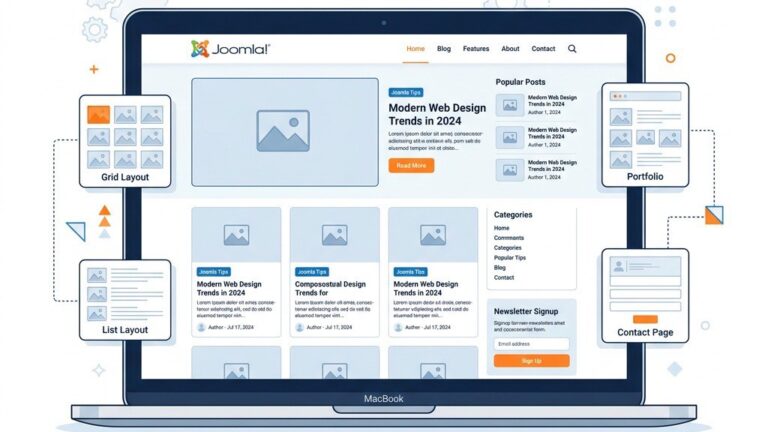
When we compare the visual and functional layers of two of the most popular content management systems, the conversation often turns to the core building blocks that shape a site’s appearance. In this guide we examine the nuances of the joomla template vs wordpress theme debate, looking at how each ecosystem approaches layout, styling, and extensibility. Our goal is to give developers and site owners a clear picture of the trade‑offs, so you can decide which path aligns with your project’s goals.
The phrase “joomla template vs wordpress theme” has become a shorthand for a deeper discussion about architecture, community support, and long‑term maintenance. Throughout this article we will revisit that comparison multiple times, grounding our analysis in real‑world scenarios and the resources available on joomlaxtc.com. By the end, you should feel confident in choosing the right solution for your next web venture.
A Joomla template is a collection of files that define the visual presentation of a Joomla site while keeping the underlying content management logic separate. The template typically includes HTML markup, CSS stylesheets, JavaScript assets, and a set of XML configuration files that tell Joomla how to render each page. This separation of concerns allows developers to focus on design without altering the core CMS code, and it aligns with the principles described in What Is Joomla.
Templates are stored in the templates directory and are selected on a per‑site or per‑menu‑item basis, giving site owners granular control over the look of individual sections. Joomla’s override system lets you replace core output with custom markup without hacking the core, a feature that is highlighted in the Joomla official documentation on template development. For those new to the platform, the how to install a Joomla template guide walks you through the process step by step.
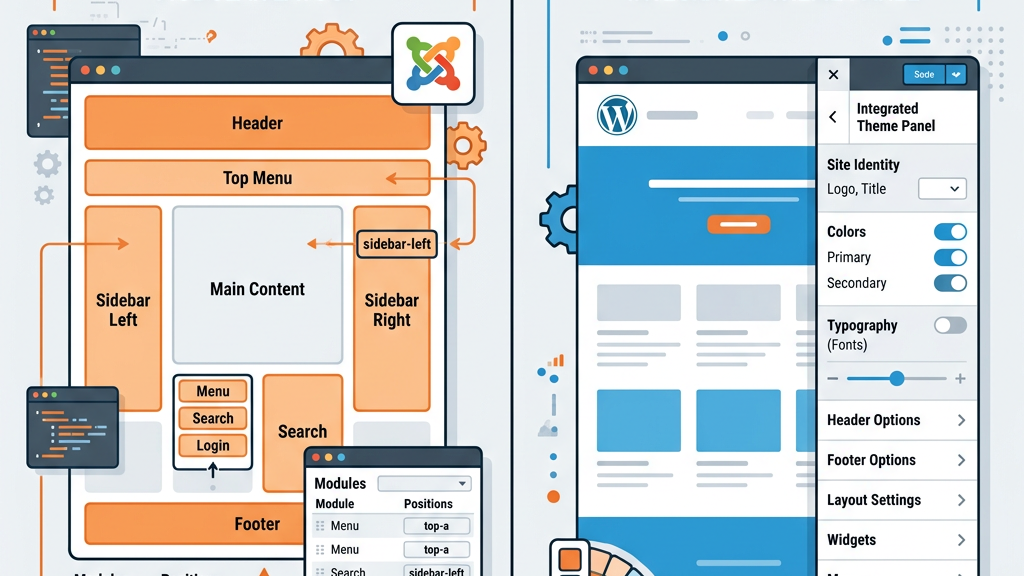
Because Joomla templates are tightly coupled with the CMS’s module and component architecture, they often include predefined module positions that act as placeholders for dynamic content. These positions are declared in the template’s XML file and can be populated with any installed module, from navigation menus to custom HTML blocks. The flexibility of this system makes Joomla a strong candidate for complex, multi‑language sites that need precise control over layout.
A WordPress theme is a package of files that together dictate the front‑end appearance of a WordPress site. Unlike Joomla’s more modular approach, a theme usually bundles PHP template files, CSS styles, JavaScript, and a style.css header that provides metadata. The theme’s PHP files call WordPress functions to retrieve content, meaning the visual layer and the content retrieval logic are more intertwined.
WordPress themes are installed in the wp-content/themes folder and can be activated with a single click from the admin dashboard. The WordPress Theme Developer Handbook outlines the required file structure, including index.php, header.php, footer.php, and optional template parts like sidebar.php. When a theme is active, WordPress loads these files in a hierarchical order to build each page.
One of the strengths of the WordPress ecosystem is the ease with which a theme can be customized using a child theme or the built‑in Customizer. Child themes inherit the parent’s templates and styles while allowing developers to override specific files, ensuring that updates to the parent theme do not erase custom work. This model is especially appealing for sites that need frequent visual tweaks without a full redevelopment.
In Joomla, the template’s sole responsibility is to present content, while the CMS core handles routing, data storage, and business logic. This clear division means that designers can work on the HTML/CSS layer without worrying about PHP code that fetches articles or user data. The template can be swapped out without affecting the underlying content, a practice encouraged by the Joomla community.
WordPress, on the other hand, blends presentation and data retrieval within the same PHP files. A theme’s single.php file, for example, contains both the loop that fetches a post and the markup that displays it. While this can speed up development for simple sites, it also creates tighter coupling, which may complicate large‑scale customizations. Developers often mitigate this by using hooks and filters, but the underlying architecture remains more interwoven than Joomla’s.
Joomla templates follow a predictable directory layout: a root folder containing an XML manifest, a css subfolder, a js subfolder, and optional html overrides. The manifest defines module positions, language files, and parameters that appear in the admin UI. This modular organization makes it straightforward to locate assets and adjust settings without digging through code.
WordPress themes typically place all template parts in the root of the theme folder, with optional assets or inc subfolders for CSS, JavaScript, and PHP includes. The style.css header provides theme metadata, and the functions.php file is often used to enqueue scripts, register menus, and add theme support. While flexible, this structure can become sprawling as a theme grows, especially when developers mix custom post types and page builders.
Joomla’s override system allows you to replace any core component or module output by placing a file with the same name in the html folder of your template. This approach does not require a separate theme package; the override lives alongside the template’s own files. The result is a clean, maintainable way to customize core functionality without touching the core code.
In WordPress, child themes serve a similar purpose but operate at the theme level. A child theme contains a style.css file that references the parent theme and optionally a functions.php file to enqueue the parent’s styles. Developers can copy specific template files from the parent into the child and modify them, ensuring that updates to the parent theme do not overwrite custom changes.
Both methods protect customizations from upstream updates, yet they differ in granularity. Joomla overrides can target individual module output, while WordPress child themes typically replace whole template files. Understanding this distinction helps teams decide which workflow aligns with their maintenance strategy.
Joomla’s module positions are defined in the template’s XML manifest and appear as named placeholders throughout the layout. When you assign a module to a position, Joomla injects its output at that exact spot. This system offers precise control over where content appears, and a single module can be reused across multiple positions.
WordPress uses widget areas, also known as sidebars, which are registered in the theme’s functions.php file. These areas can be placed in any part of a theme using dynamic_sidebar(). While flexible, widget areas are generally less granular than Joomla’s positions, because they rely on the theme’s markup to decide where the widget output is inserted.
Both systems enable non‑technical users to drag and drop content blocks, but Joomla’s approach tends to be more layout‑centric, whereas WordPress focuses on content blocks that can be placed in predefined zones. Choosing between them often depends on how much control you need over the exact placement of each element.
Customizing a Joomla template usually involves editing its CSS, adjusting parameters in the template’s admin panel, or creating overrides for specific components. The customize a Joomla template guide walks through common scenarios such as changing color schemes, modifying layout grids, and adding custom JavaScript.
WordPress themes often provide a Customizer interface where users can tweak colors, fonts, and layout options in real time. For deeper changes, developers edit the theme’s PHP files or create a child theme. The Customizer’s live preview is a powerful tool for non‑developers, but it can be limited by the theme’s built‑in options.
Both platforms support third‑party page builders that add drag‑and‑drop functionality, yet the underlying philosophy differs. Joomla’s overrides let you target any component without altering the theme, while WordPress relies on the theme’s template hierarchy and hooks. Understanding these mechanisms helps teams decide how much code they are willing to maintain.
The Joomla marketplace offers a mix of free and premium templates, many of which are curated on free Joomla templates and Joomla 4 templates. Prices typically range from $30 to $80 for premium designs, and the community provides extensive documentation and support forums.
WordPress boasts a larger marketplace, with thousands of themes available on ThemeForest, the official WordPress theme directory, and independent developers. Pricing varies widely, from free GPL‑licensed themes to premium options exceeding $100. The sheer volume of choices can be overwhelming, but it also means there is likely a theme for any niche.
Both ecosystems benefit from active developer communities, but the Joomla community tends to be more focused on enterprise‑level solutions, while WordPress attracts a broader range of hobbyists and agencies. The W3Techs CMS usage statistics illustrate the market share differences, giving you context for the level of support you can expect.
Performance in Joomla largely depends on how efficiently the template loads assets and utilizes module positions. Well‑coded templates minimize HTTP requests, combine CSS files, and use Joomla’s built‑in caching. The same principles apply to WordPress, where theme developers often include minified assets and support lazy loading.
Both platforms benefit from server‑side caching plugins and CDN integration, but Joomla’s architecture can give developers finer control over caching at the module level, while WordPress relies more on plugin solutions. Ultimately, the choice of template or theme, combined with proper optimization, determines the site’s speed.
| Feature | Joomla Template | WordPress Theme |
|---|---|---|
| Architecture | Presentation‑only layer; core logic separate | Combined presentation and data retrieval in PHP files |
| Override Mechanism | HTML overrides per component/module | Child theme inheritance |
| Layout Control | Module positions defined in XML | Widget areas (sidebars) registered in functions |
| Customization | CSS, parameters, overrides | Customizer, child theme, PHP edits |
| Marketplace Size | Smaller, focused on premium designs | Very large, free and premium options |
| Pricing Range | $30‑$80 for premium | Free to >$100 |
| Documentation | Official docs and community guides | WordPress Theme Developer Handbook, extensive tutorials |
| Community Support | Active but niche | Massive global community |
| Update Safety | Overrides protect core updates | Child themes protect parent updates |
| Learning Curve | Steeper for non‑technical users | Generally easier due to UI tools |
This joomla template vs wordpress theme comparison table highlights the most important distinctions. If your project requires granular control over module placement, multilingual support, or a tightly integrated component system, Joomla templates often provide the flexibility you need. The ability to define custom module positions directly in the template’s XML file makes it easier to build complex layouts without resorting to page‑builder plugins. The joomla template vs wordpress theme decision ultimately depends on your project requirements.
Enterprise‑level sites that demand strict separation of presentation and business logic also benefit from Joomla’s architecture. Because the template does not contain PHP code that fetches content, designers can work independently of developers, reducing the risk of accidental data‑layer changes. This separation aligns well with teams that follow a strict front‑end/back‑end division of labor.
Finally, if you are already invested in the Joomla CMS ecosystem—using extensions, custom components, or the Joomla blog templates—sticking with Joomla templates ensures compatibility and a smoother upgrade path. In such cases, the phrase “joomla template vs wordpress theme” becomes less about superiority and more about fitting the right tool to the existing stack.
The primary advantage is the clean separation between design and content logic. Joomla templates focus solely on markup and styling, while the CMS handles data retrieval and routing. This separation makes it easier to update the look of a site without risking core functionality.
No. Joomla templates are built for Joomla’s rendering engine and rely on its module and component system. WordPress themes use PHP functions and a different template hierarchy, so they are not interchangeable.
Child themes inherit the parent theme’s files and allow you to replace specific templates, while Joomla overrides let you replace the output of any core component or module without creating a separate theme package. Both protect customizations from updates, but they operate at different levels of the system.
WordPress generally offers a larger library of free themes, thanks to its massive user base and the official theme directory. Joomla also provides free templates, but the selection is more curated and often geared toward professional use.
Switching platforms typically requires rebuilding the site because the underlying data structures and rendering engines differ. While you can export content, you will need to recreate the layout using a WordPress theme that matches your design goals.
Both Joomla templates and WordPress themes have distinct strengths, and the right choice depends on your project’s technical requirements, team workflow, and long‑term maintenance plan. By understanding the architectural differences and ecosystem resources, you can make an informed decision that supports your site’s success. We hope this joomla template vs wordpress theme guide helps you pick the right system for your next project.