Physical Address
304 North Cardinal St.
Dorchester Center, MA 02124
Physical Address
304 North Cardinal St.
Dorchester Center, MA 02124

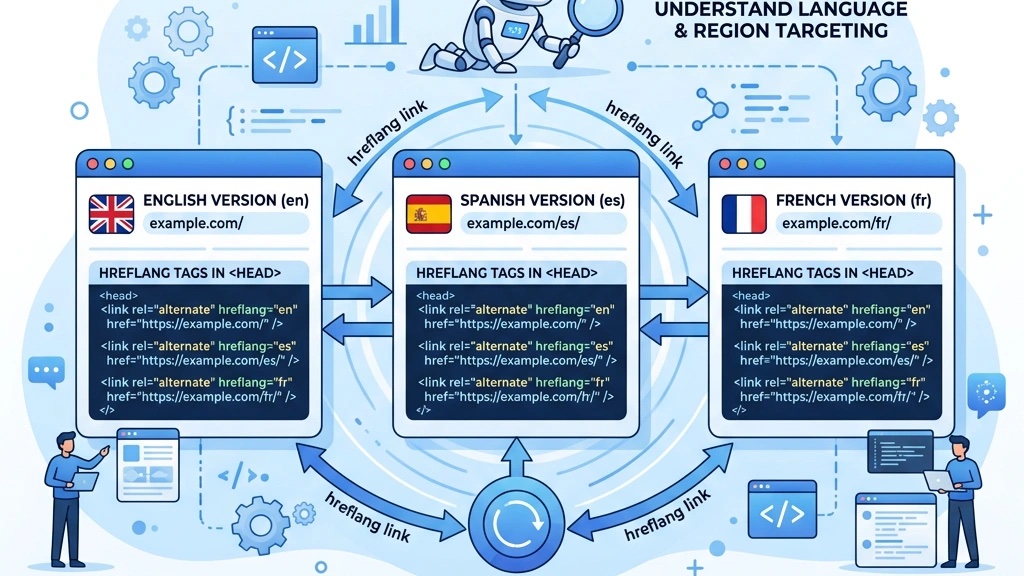


Over half of all Google searches are performed in languages other than English. Yet many Joomla site owners still launch multilingual sites without the proper SEO foundation, leading to duplicate content penalties, lost traffic, and confusing search‑engine signals. Joomla’s built‑in multilingual framework gives us the tools to serve content in multiple languages, but it does not automatically handle the nuances of international SEO. Building on our complete Joomla SEO guide, in this article we will walk through the two most critical aspects of multilingual Joomla SEO: hreflang implementation and URL structure. By the end of this article we will have a clear roadmap for configuring our sites so that search engines can correctly index and serve the right language version to the right audience.
/en/, /fr/) consolidates domain authority and is generally the preferred approach for Joomla multilingual sites.When we decide how to expose language versions of our site, we typically choose among three patterns:
https://example.com/en/https://en.example.com/https://example.fr/Each approach has its own implications for domain authority, maintenance, and user perception.
Subdirectories keep all language versions under a single domain, allowing us to pool link equity and avoid the need for separate SSL certificates. This consolidation is especially valuable when we have limited resources for managing multiple domains.
Subdomains can be useful when we want to isolate content or when we need distinct hosting environments. However, search engines treat subdomains as separate entities, which can dilute link equity unless we invest in robust cross‑domain linking.
ccTLDs are the most geographically explicit, but they require separate domain registration, hosting, and SEO effort for each country. They are rarely necessary unless we have a truly global brand with separate legal entities in each region.
Below is a comparison table that highlights the key differences:
| Feature | Subdirectory | Subdomain | ccTLD |
|---|---|---|---|
| Domain Authority | Shared | Separate (but can be linked) | Separate |
| SSL Management | One certificate | One certificate per subdomain | One certificate per domain |
| Maintenance | Centralized | Decentralized | Decentralized |
| User Perception | “International” | “Regional” | “Local” |
| Implementation in Joomla | Default (System‑Language Filter) | Requires additional configuration | Requires separate sites |
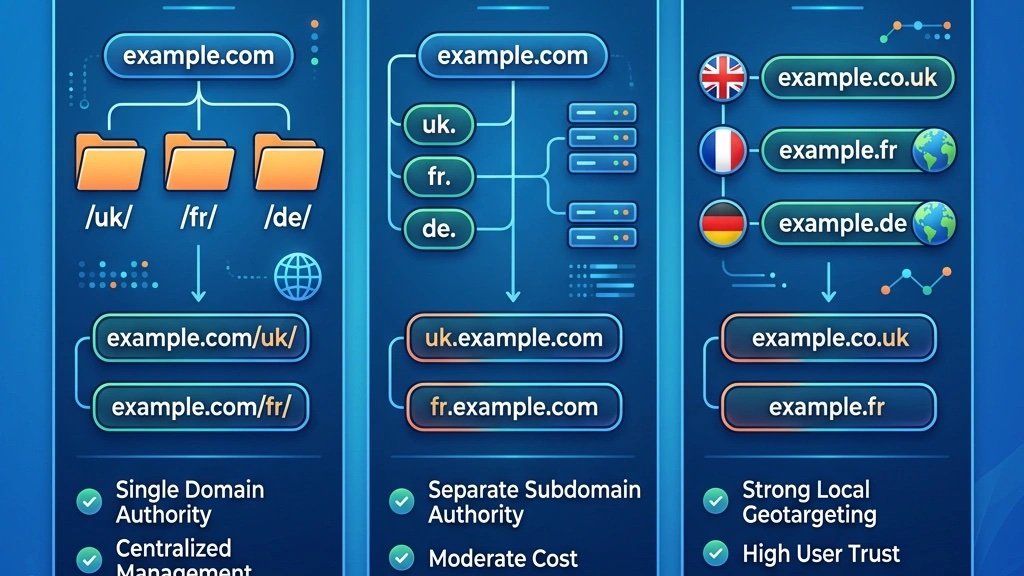
In most cases, the subdirectory approach is the most efficient for Joomla multilingual sites, especially when we aim to maximize SEO impact without spreading resources thin.
Joomla’s System‑Language Filter plugin is responsible for adding language prefixes to URLs. When we enable this plugin and set the Language Filter to “Prefix” or “Hide” (depending on our preference), Joomla automatically rewrites URLs to include the language code.
The process works as follows:
/en/) to the article alias.If we enable SEF URLs in the Global Configuration (see our SEF URL configuration guide), Joomla removes the index.php part and cleans up the path, resulting in a user‑friendly link like https://example.com/en/about-us.
Because Joomla’s URL generation is deterministic, we can rely on it to produce consistent language‑specific URLs across the site, which is essential for both hreflang tags and sitemap entries.
To keep our URLs clean and SEO‑friendly, we follow a set of practical guidelines:
/fr/about-us) and Spanish (/es/about-us). This consistency helps search engines recognize the content as a single entity.By adhering to these practices, we create a solid foundation that supports both user experience and search‑engine visibility.
The tag is the primary signal that a page has language variants. The hreflang attribute can be a simple language code (e.g., en) or a combined language‑region code (e.g., en-US).
Search engines read these tags to determine which version to show to users based on their language or region preferences. For example, a user browsing in French from Canada should see the fr-CA version if it exists; otherwise, the generic fr version is displayed.
The syntax is straightforward:
<link rel="alternate" hreflang="en" href="https://example.com/en/about-us"/>
<link rel="alternate" hreflang="fr" href="https://example.com/fr/about-us"/>
<link rel="alternate" hreflang="es" href="https://example.com/es/about-us"/>
<link rel="alternate" hreflang="x-default" href="https://example.com/about-us"/>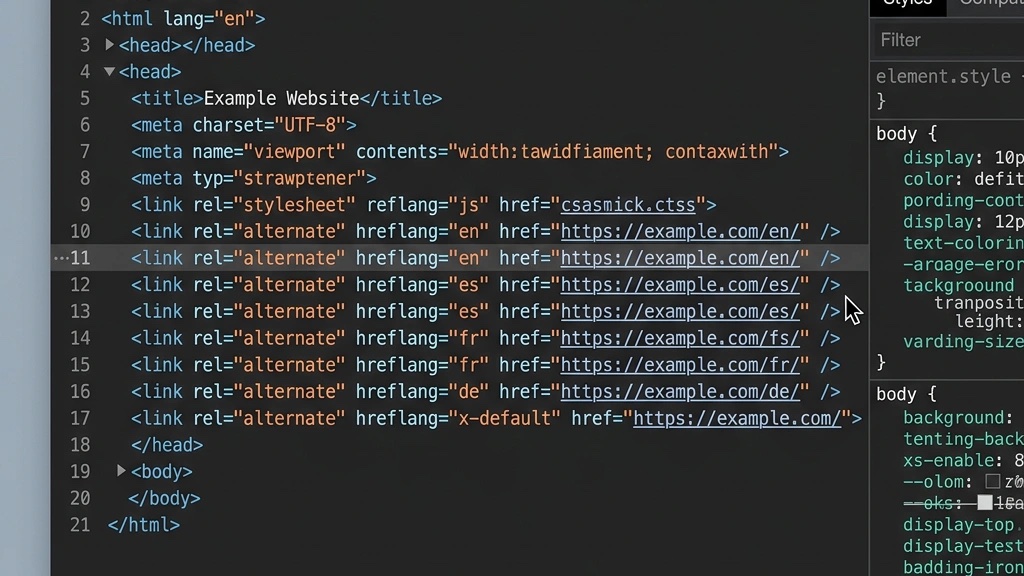
Notice that each tag points to a specific language version, and the x-default tag provides a fallback for users whose language is not explicitly covered.
The x‑default tag is a special value that tells search engines which page to serve when no language or region match is found. We typically use it for the default language of the site or for a generic landing page that serves as a fallback.
In Joomla, the default language is set in the Languages manager. If we have a default language of English, the x-default tag should point to the English URL (/en/). This ensures that users who do not match any other hreflang tag still receive a relevant page.
We must be careful not to duplicate the x-default tag across multiple pages unless they truly serve as universal fallbacks. Misusing x-default can confuse search engines and lead to unpredictable indexing.
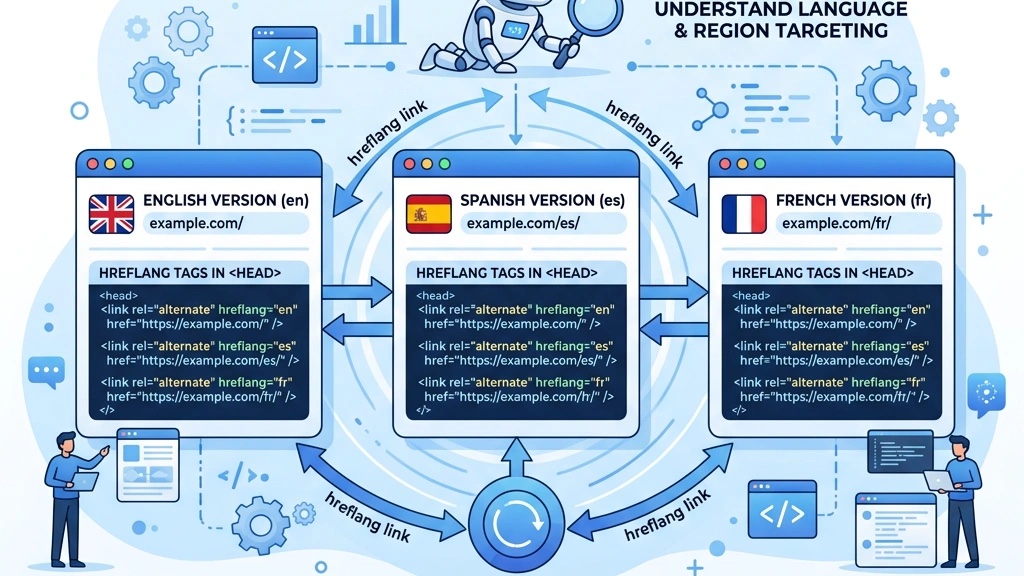
A common mistake is to include only forward references (e.g., English page linking to French and Spanish pages) but omitting the reverse references. Search engines require bidirectional references: every language version must list all other variants, including itself.
If we omit a reference, Google may treat the entire cluster as invalid and ignore all hreflang tags for that set of pages. This can result in the wrong language version being shown to users, especially in regions where that language is the default.
The correct implementation looks like this:
<!-- English page -->
<link rel="alternate" hreflang="en" href="https://example.com/en/about-us"/>
<link rel="alternate" hreflang="fr" href="https://example.com/fr/about-us"/>
<link rel="alternate" hreflang="es" href="https://example.com/es/about-us"/>
<link rel="alternate" hreflang="x-default" href="https://example.com/en/about-us"/>

<!-- French page -->
<link rel="alternate" hreflang="fr" href="https://example.com/fr/about-us"/>
<link rel="alternate" hreflang="en" href="https://example.com/en/about-us"/>
<link rel="alternate" hreflang="es" href="https://example.com/es/about-us"/>
<link rel="alternate" hreflang="x-default" href="https://example.com/en/about-us"/>
By ensuring that each page references all others, we give search engines a complete picture of the multilingual relationship, which improves indexing accuracy and user experience.
Language associations are the backbone of Joomla’s multilingual system. They link content items (articles, menus, modules) across languages, allowing the CMS to generate the correct URLs and hreflang tags automatically when we enable the Language Associations plugin.
Step‑by‑step process:
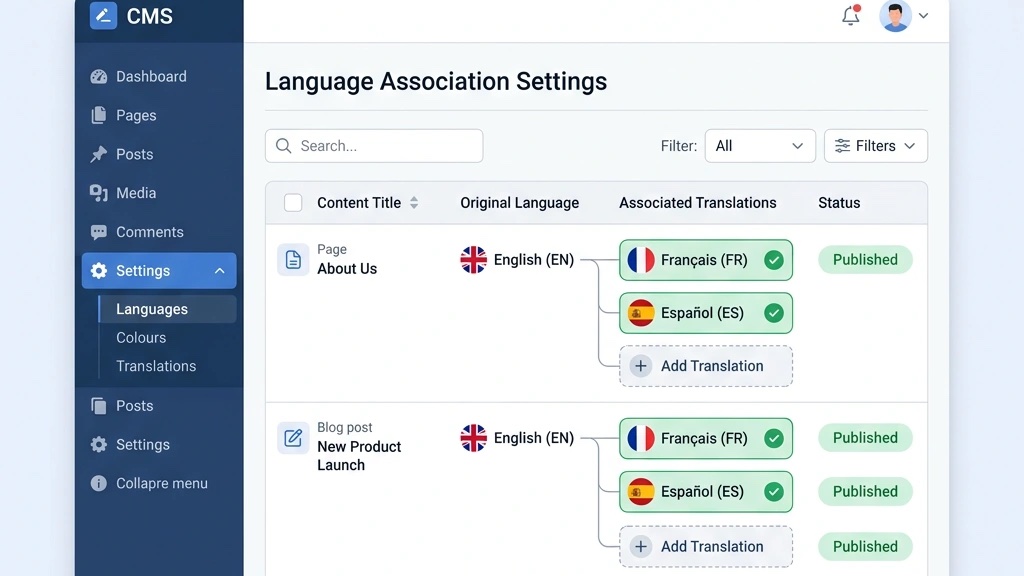
When we load the page, Joomla injects the appropriate hreflang tags into the section based on the stored associations. This eliminates the need for manual tag insertion and reduces the risk of errors.
If we need to customize the tags (e.g., add region codes), we can extend the plugin or use a template override to modify the output while still relying on the underlying associations.
While Joomla’s core provides basic hreflang support, many site owners prefer a dedicated extension for more granular control. Popular options include:
x-default tags, and generate tags for automatically.When choosing an extension, we weigh the following considerations:
If we opt for a manual approach, we can place the hreflang tags directly in the template’s section using PHP loops that iterate over the language list. Below is a simple example:
<?php foreach ($languages as $lang): ?>
<link rel="alternate" hreflang="<?php echo $lang->lang_code; ?>" href="<?php echo JRoute::_(ContentHelperRoute::getArticleRoute($article->id, $article->catid, $lang->lang_code), true, -1); ?>">
<?php endforeach; ?>
<link rel="alternate" hreflang="x-default" href="<?php echo JRoute::_(ContentHelperRoute::getArticleRoute($article->id, $article->catid), true, -1); ?>">
This code dynamically generates tags for every language associated with the article, ensuring bidirectional references.
In addition to HTML head tags, we can embed hreflang information in the XML sitemap. Search engines read the sitemap to discover URLs and can use the hreflang attributes to understand language relationships.
A typical sitemap entry for a multilingual page looks like this:
<url>
  <loc>https://example.com/en/about-us</loc>
  <lastmod>2024-03-12</lastmod>
  <changefreq>weekly</changefreq>
  <priority>0.8</priority>
  <xhtml:link rel="alternate" hreflang="en" href="https://example.com/en/about-us"/>
  <xhtml:link rel="alternate" hreflang="fr" href="https://example.com/fr/about-us"/>
  <xhtml:link rel="alternate" hreflang="es" href="https://example.com/es/about-us"/>
  <xhtml:link rel="alternate" hreflang="x-default" href="https://example.com/en/about-us"/>
</url>
We can generate this sitemap using Joomla’s XML Sitemap extension or by customizing the sitemap generator to include the xhtml:link elements. Submitting the sitemap to Google Search Console ensures that the hreflang relationships are recognized even if the HTML tags are missing or delayed.
One of the most frequent errors is omitting the self‑referencing tag or any of the other language references. Google’s International Targeting report in Search Console will flag pages with missing hreflang tags, often labeling them as “Invalid hreflang tags.”
To diagnose, we can use the Google Search Console report or third‑party tools like Ahrefs Site Audit. The report will list URLs that lack proper tags, allowing us to prioritize fixes.
A quick fix involves adding the missing tags manually or enabling the associations plugin, which automatically injects the correct references.
When we have partial translations or placeholder content, search engines may treat the pages as duplicate content. Our guide on Joomla canonical URLs covers this topic in depth, especially if the canonical tag points to the same URL. To avoid this, we: canonical tags that reference the current language page and use hreflang tags to signal the language relationship.
If a page is not fully translated, we can either:
x-default tag to serve a generic version that is clearly marked as non‑localized.Both approaches help search engines understand that the content is unique to each language version and not a duplicate.
Many site owners rely on machine translation to quickly populate multilingual content. While this saves time, it can lead to unnatural phrasing, missing context, and low quality signals. Google’s quality raters evaluate translated pages, and poorly translated content can hurt rankings.
We recommend a hybrid approach: use machine translation as a first draft, then have a native speaker review and edit the text. This ensures that the final content is both accurate and engaging, which improves user experience and SEO performance.
Google Search Console’s International Targeting report provides a clear view of hreflang implementation status. It shows which pages have valid tags, which have missing tags, and which have errors.
To use the report:
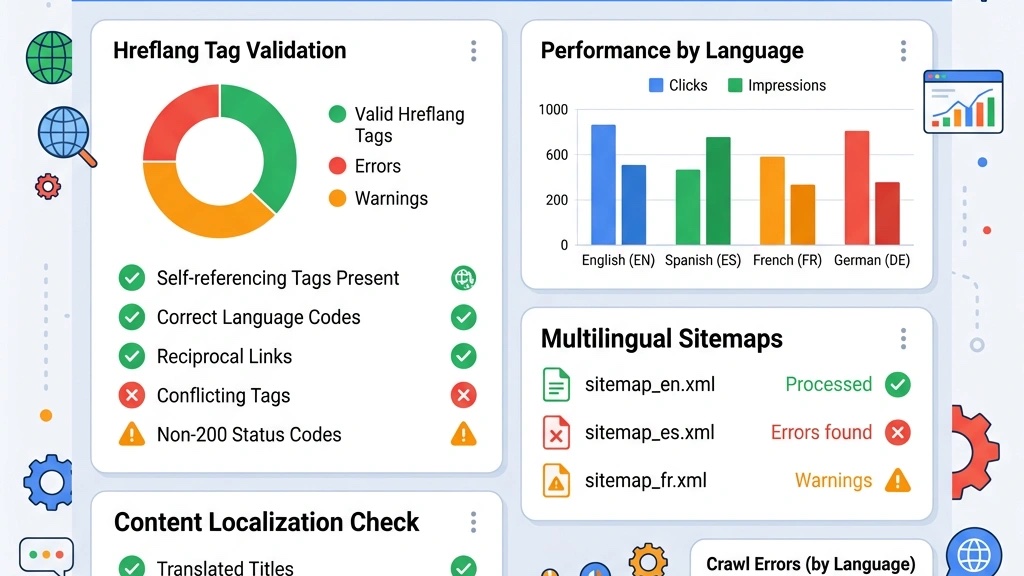
The report also highlights any mismatches between the language code in the URL and the hreflang tag, which can be a common source of confusion.
Several tools can validate our hreflang setup beyond Google’s console:
Running these tools regularly helps us catch issues early, especially after adding new content or updating language versions.
To keep our multilingual SEO healthy, we establish a monitoring routine:
By integrating these checks into our workflow, we maintain a robust multilingual presence that serves both users and search engines effectively.
What is the correct hreflang format for Joomla?
The format is , where xx can be a language code (en) or a language‑region code (en-US). The tag must be placed in the section of each page.
Does Joomla add hreflang tags automatically?
When the Language Associations plugin is enabled and language associations are set, Joomla automatically injects the basic hreflang tags. For more advanced control, we can use extensions or custom code.
Should I use subdomains or subdirectories for Joomla multilingual?
Subdirectories are generally preferred because they consolidate domain authority and simplify management. Subdomains can be used if we need separate hosting or legal separation.
How do I fix missing hreflang tags in Google Search Console?
Identify the URLs flagged as errors, then add the missing tags manually or enable the associations plugin. After fixing, request a recrawl in GSC.
Can I use hreflang with Joomla’s default SEF URLs?
Yes. SEF URLs work seamlessly with hreflang tags; the language prefix is part of the URL path, and the tags reference those URLs.
What happens if hreflang tags are not bidirectional?
Search engines may ignore the entire cluster of pages, leading to the wrong language version being shown to users. Bidirectional references are essential for proper indexing, as Yoast’s hreflang guide confirms.