Physical Address
304 North Cardinal St.
Dorchester Center, MA 02124
Physical Address
304 North Cardinal St.
Dorchester Center, MA 02124



joomla seo component is the cornerstone of any Joomla‑driven site that wants to climb the search rankings. In the next few minutes we will walk through the anatomy of these extensions, compare the market leaders, and show how to squeeze every drop of on‑page power from them.
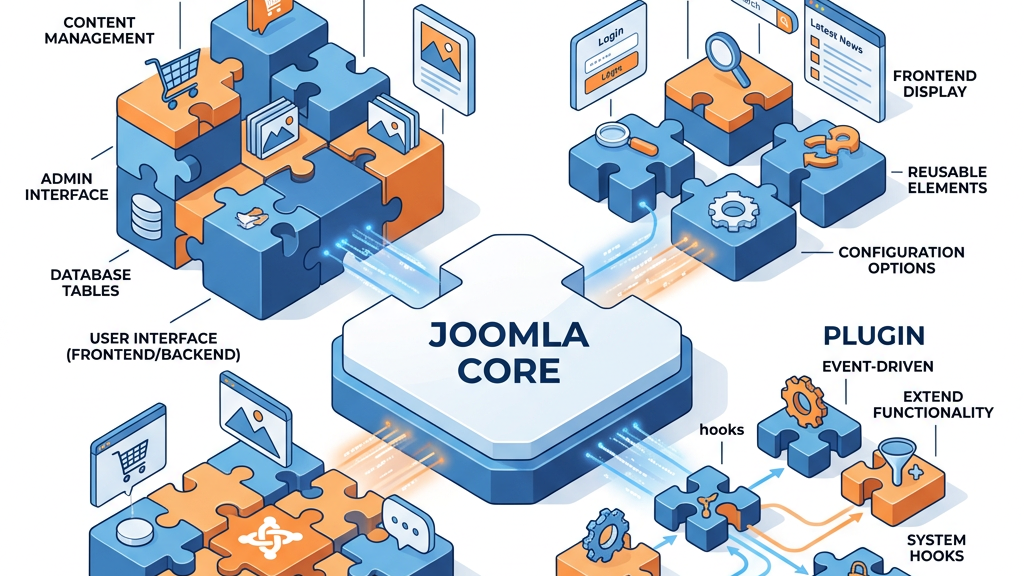
Joomla builds its functionality through three main extension types. Components act as mini‑applications, receiving the bulk of the request and rendering the main view. Plugins hook into events such as onContentPrepare to modify content on the fly, while modules are lightweight blocks that sit in positions on a page. This separation is like a theater production: the component writes the script, the plugin adds the lighting cues, and the module displays the props on stage.
Because SEO touches almost every part of a page, a component is the natural home for site‑wide metadata. It can read the article’s title, pull in custom fields, and write the tags before the browser ever sees the HTML. Plugins can supplement this work, but they lack the central control needed for consistent URL handling and sitemap creation.
A typical SEO plugin might add a single meta description field to the article editor. An SEO component, however, governs the entire lifecycle of a page: from URL generation to schema injection. Think of a plugin as a sidekick that whispers suggestions, while a component is the director that decides the final cut. This distinction matters when you need to enforce SEF URLs across thousands of items or when you want a unified redirect manager.
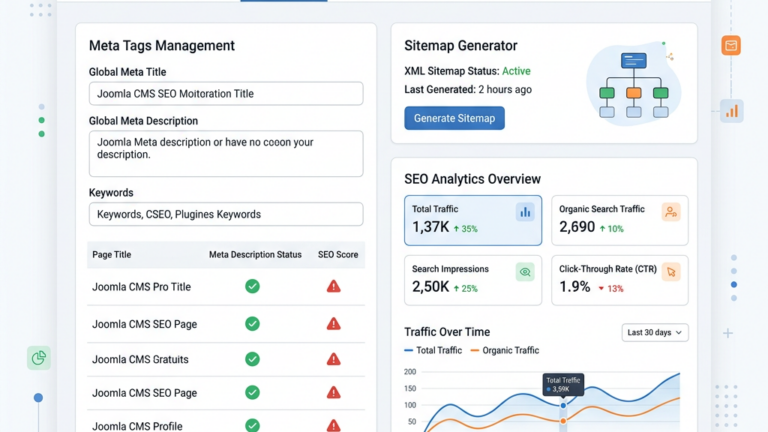
Components often ship with a dashboard that aggregates data from Google Search Console, broken‑link reports, and keyword tracking. Plugins rarely provide that level of visibility, leaving you to piece together information from disparate sources.
Modules, on the other hand, act as display helpers that can surface SEO‑related widgets—such as a “most‑linked pages” list—on the front end. While modules are handy for quick visual cues, they do not replace the central authority of a component. By keeping meta‑tag generation, canonical logic, and sitemap creation inside a single component, we maintain a single source of truth that simplifies maintenance and reduces the risk of conflicting settings.
1. Meta tag automation – auto‑fill title, description, and Open Graph tags based on article content or custom fields.
2. Canonical URL handling – generate a single preferred URL for each piece of content to avoid duplicate‑content warnings.
3. Schema markup support – embed JSON‑LD for articles, products, FAQs, and events to unlock rich results.
4. XML sitemap generation – create a dynamic sitemap that updates whenever you publish, edit, or delete items.
5. Redirect manager – store 301/302 redirects, monitor broken links, and automatically fix common URL changes.
6. Integration with Google Search Console – pull in crawl errors and indexing status for quick remediation.
These pillars form the backbone of any serious on‑page optimization strategy.
When these features operate together, they behave like a well‑orchestrated symphony. The meta‑tag engine sets the tone, the canonical system keeps the rhythm steady, and the schema layer adds the harmonies that catch a search engine’s ear. The sitemap acts as the conductor’s score, directing crawlers to every movement, while the redirect manager makes sure that any missed notes are swiftly corrected. This interplay creates a feedback loop: as the Search Console reports new errors, the component can automatically adjust redirects or update canonical tags, keeping the site in tune with Google’s expectations.
On top of that, the integration of these tools under a single interface reduces the cognitive load on site administrators. Instead of juggling separate extensions for tags, redirects, and sitemaps, we can glance at one dashboard, spot an issue, and apply a fix in a few clicks. The result is a tighter, faster‑responding SEO workflow that scales as the site grows.
4SEO arrived as a modern replacement for the aging sh404SEF, offering a fresh UI and tighter integration with Joomla 4 and Joomla 5. The component automatically generates meta titles and descriptions using token patterns, and it can pull data from custom fields for richer Open Graph output. Its built‑in broken‑link checker scans the entire site each night, flagging 404s for quick fixes. Pricing starts at $95 per year, with a free trial that lets you test the redirect manager and sitemap generation before committing.
Compatibility with Joomla 4 and the upcoming Joomla 5 release means that 4SEO respects the new routing system and the updated PHP requirements. During migration from sh404SEF, the component offers an import wizard that reads existing redirect tables and canonical settings, translating them into the 4SEO format without manual re‑entry. This smooth transition helps us preserve historic link equity while taking advantage of the newer architecture.
Schema markup is a core strength of 4SEO. It ships with preset JSON‑LD templates for articles, products, FAQs, and events, and it lets us map any custom field to a schema property. For an e‑commerce site, we can bind the price field from VirtueMart directly into the product schema, so that Google’s rich snippets display accurate pricing information. The component also supports multiple schema types on a single page, allowing us to layer FAQ markup beneath an article schema for maximum visibility.
sh404SEF has been the go‑to SEO extension for Joomla since 2008. Its hallmark is the powerful SEF URL engine that rewrites every Joomla route into a clean, search‑engine‑friendly format. The redirect manager stores old URLs and automatically creates 301 redirects, preserving link juice when you change article slugs. It also provides basic analytics, showing which pages receive the most clicks from Google. Although the developers announced a phased‑out plan in 2024, existing customers still receive updates, and the price remains $79 per year for a single‑site license.
The URL customization engine lets us define patterns that combine category, alias, and language segments, giving us fine‑grained control over the final address. We can enforce a “/blog/2024/awesome‑post” structure across all articles, which not only looks tidy but also reinforces topical relevance for search engines. The engine also supports redirects for legacy URLs, so that any old Joomla 1.5 links continue to resolve correctly after an upgrade.
Analytics inside sh404SEF are modest but useful. The extension logs the top‑referring domains, the most‑visited pages, and the frequency of 404 errors. These reports appear in a simple table that we can export for deeper analysis. The community around sh404SEF remains vocal; many long‑time users appreciate its stability and fear losing the familiar workflow, even as the roadmap shifts toward newer solutions like 4SEO.
Beyond the flagship duo, several niche components compete for attention:
| Component | Meta Tags | Sitemap | Redirects | Schema Markup | Pricing |
|———–|———–|———|———–|—————|———|
| iSEO | ✔️ (auto & manual) | ✔️ (dynamic) | ✔️ (bulk) | ✔️ (LD‑JSON) | $147 / yr |
| Route66 | ✔️ (basic) | ✔️ (static) | ✔️ (simple) | ❌ | $59 / yr |
| RSSeo! Suite | ✔️ (advanced) | ✔️ (auto) | ✔️ (rules) | ✔️ (rich snippets) | $119 / yr |
iSEO shines with its granular keyword‑density analysis, allowing us to see exactly how often a term appears in each section of an article. Its bulk‑edit interface makes it easy to apply meta‑tag templates across hundreds of items, which is a boon for multilingual sites. The component also integrates with our Joomla SEO guide, offering step‑by‑step tutorials on how to fine‑tune each setting.
Route66 is a lightweight option that excels for small blogs or single‑page sites. Its static sitemap generator is simple to configure, and the redirect manager handles basic 301 moves without overwhelming the admin panel. Though it lacks built‑in schema support, we can pair it with a separate markup plugin if needed, and its price point fits comfortably within a modest budget.
RSSeo! Suite offers a visual sitemap editor that feels like a treasure‑map of our site’s architecture. The drag‑and‑drop interface lets us rearrange sections, set priority levels, and instantly preview how search engines will interpret the structure. Its schema engine includes a dedicated FAQ generator, which we use to enrich our support articles and earn position‑zero results. For a deeper dive, our Joomla SEO Plugins comparison page walks through each feature in side‑by‑side detail.
“A well‑configured SEO component is the compass that keeps your Joomla site on the right bearing, even when the winds of algorithm updates blow hard.” – senior Joomla developer
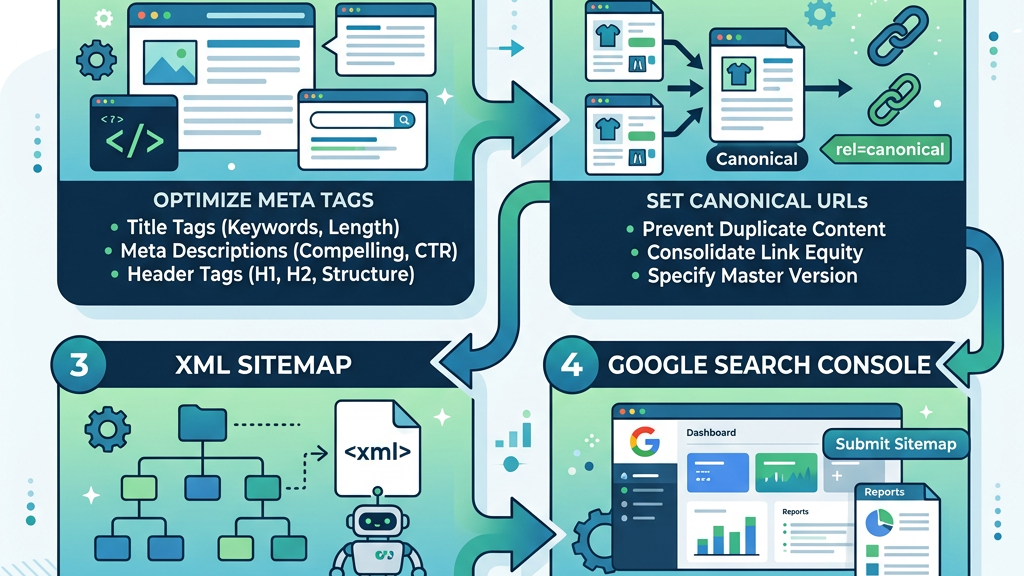
Meta tags act as the first handshake between your page and a search engine. A well‑crafted meta title, limited to 60 characters, tells Google what the page is about, while the meta description, up to 160 characters, invites clicks from the SERP. Open Graph tags extend this handshake to social platforms, so that shared links display a proper image, title, and summary. Components like 4SEO let you set default patterns—e.g., {article.title} | {site.name}—and then override them per article when needed.
We often start with our Meta Keywords guide to decide which terms to prioritize in the title and description. By aligning the meta content with the article’s focus, we improve relevance signals without resorting to keyword stuffing. The Open Graph settings also allow us to map a custom field to the og:image tag, guaranteeing that each social share showcases a high‑resolution picture that catches the eye.
Beyond the basics, we can enrich the Open Graph payload with article type, publication date, and author information. This extra data helps platforms like Facebook and LinkedIn render richer cards, which in turn boosts click‑through rates. When we test the output with the Facebook Sharing Debugger, we verify that all tags are present and correctly formatted for a smooth user experience across the web.
Duplicate content is the silent thief that drains ranking power. Joomla can generate multiple URLs for the same article (e.g., with and without a trailing slash, or via category paths). An SEO component inserts a tag pointing to the preferred URL, signalling to Google which version to index. Some components also offer a “canonical auto‑detect” mode that compares the current URL with the site’s routing table and corrects mismatches on the fly.
Our SEO-Friendly URLs guide explains how to configure the routing system so that the canonical URL matches the most natural, human‑readable path. By consolidating link equity onto a single address, we avoid splitting Page value across duplicate pages. The component also monitors for accidental canonical loops, alerting us before they cause crawl errors.
When we combine canonical tags with a reliable redirect manager, we create a safety net for any URL changes. If an article is moved to a new category, the component automatically generates a 301 redirect from the old path to the new canonical URL, preserving inbound links and preventing users from landing on a 404 page. This coordinated approach keeps both users and search engines satisfied.
An XML sitemap is a roadmap for crawlers, listing every URL you want indexed along with priority and change‑frequency hints. Modern components generate the sitemap automatically whenever you publish or delete content, eliminating the need for manual uploads. They also provide a one‑click button to submit the sitemap to Google Search Console, reducing the time it takes for new pages to appear in search results.
We rely on our Google Search Console integration guide to verify that the sitemap submission succeeded and to monitor any crawl errors that arise. The component can fetch the latest coverage report and display it directly in its dashboard, giving us a clear view of which pages are indexed, which are excluded, and why. This immediate feedback loop helps us act quickly on any issues.
In addition to the main sitemap, the component can generate specialized sitemaps for images, videos, and multilingual content. By separating these assets, we give search engines clearer signals about the type of media associated with each page. This granularity often leads to richer search results, such as image carousels or video thumbnails, which drive additional traffic.

1. Download the latest 4SEO package from the Joomla Extensions Directory.
2. Install it via Extensions → Manage → Install and enable the plugin “4SEO – Core”.
3. Go to Components → 4SEO → Settings and choose your default language, site name, and URL format.
During the first run, 4SEO scans the database and creates a default sitemap file (sitemap.xml). It also detects existing redirects and imports them into its internal manager. We then verify the initial settings against our Joomla SEO guide to confirm that the token patterns match our branding guidelines.
The configuration wizard guides us through the essential steps, from selecting the meta‑tag template to enabling the schema generator. By the end of the process, the component is ready to generate tags for every new article automatically, saving us hours of manual entry.
After installation, we test the front‑end output using the browser’s view‑source tool. We look for the presence of the tags, the canonical link, and the JSON‑LD script. If anything is missing, we return to the settings page and adjust the field mappings until the markup appears as expected.
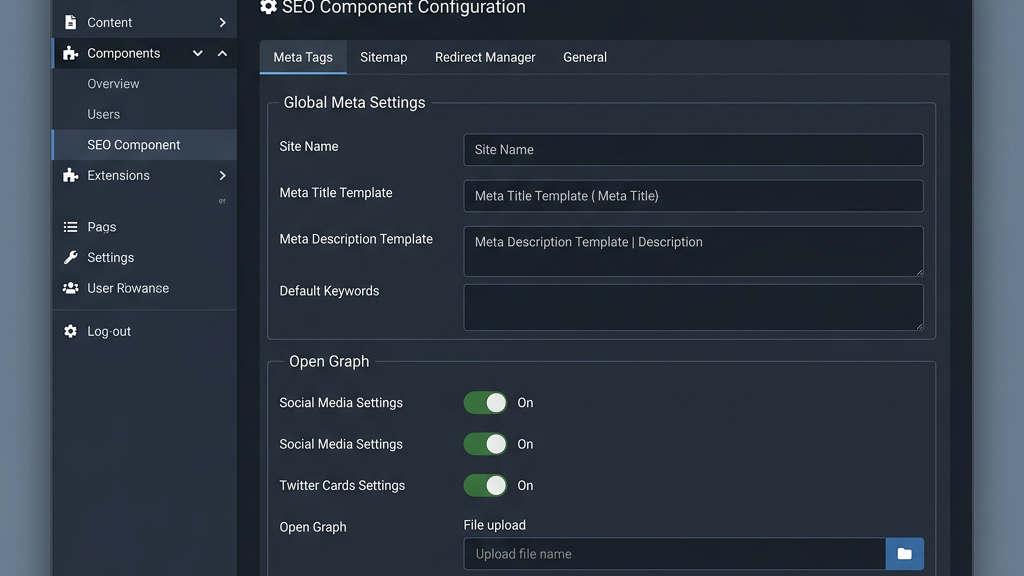
In the Meta Tags tab, enable “Auto‑generate title” and select the token pattern {category.title} – {article.title}. For the description, tick “Use first 155 characters of article body” and enable the “Trim at word boundary” option to avoid cutting words mid‑sentence. Open Graph settings let you map a custom field (og_image) to the article’s featured image, so that social shares always display a high‑resolution picture.
We also set fallback defaults for articles that lack a custom field, pulling the site description from the global configuration. This guarantees that every page, even those created by guest authors, receives a complete set of meta data. The component’s preview pane shows a live rendering of the tags, allowing us to fine‑tune the pattern before saving.
To keep the meta tags consistent across languages, we enable the multilingual option and link each language’s title pattern to its respective translation. This approach respects the nuances of each market while maintaining a unified SEO strategy. Our Meta Keywords guide provides additional guidance on choosing appropriate terms for each language variant.
The Redirect Manager offers a bulk import tool: upload a CSV with old URL, new URL, and redirect type (301 or 302). After import, 4SEO validates each target and flags any loops. The Broken Link Checker runs nightly, emailing a report that lists URLs returning 404. You can click a link in the report to open the redirect editor and fix the issue with a single tap.
We schedule the checker to run after major content updates, so that any newly broken links are caught before they affect user experience. The dashboard also displays a summary of redirect activity, showing how many redirects were created, modified, or removed in the past month. This visibility helps us audit the health of our URL structure regularly.
When a redirect is created, the component automatically updates the sitemap to reflect the new destination, preventing search engines from crawling dead ends. By coupling redirects with the Google Search Console integration, we can see which redirected URLs still generate crawl errors and address them promptly.
For a blog or a small corporate site with fewer than 200 pages, a lightweight component like Route66 may be sufficient. It handles meta tags and a basic sitemap without overwhelming the admin panel. Large portals with thousands of articles, multiple language versions, and an active forum benefit from the richer feature set of 4SEO or RSSeo! Suite, which can manage bulk redirects and provide detailed keyword‑density reports.
We evaluate the site’s growth trajectory before deciding. If we anticipate adding new sections, e‑commerce categories, or a community forum, we lean toward a component that scales gracefully. Our SEO-Friendly URLs guide outlines best practices for structuring URLs on large sites, helping us avoid future re‑routing headaches.
In addition, the dashboard’s ability to pull data from Google Search Console becomes essential as the site expands. A single pane of glass for crawl errors, indexing status, and performance metrics saves us from juggling multiple reporting tools.
If we run an online store with HikaShop or VirtueMart, we need an extension that can inject product schema markup and manage pagination URLs. RSSeo! Suite includes a dedicated “Product SEO” module that adds price, availability, and review fields to the JSON‑LD output. 4SEO also supports custom field mapping, allowing us to pull price data from the e‑commerce component into the meta description.
We also configure canonical tags for filtered product listings, so that only the primary version of a product page is indexed. The component’s redirect manager helps us handle discontinued products by pointing old URLs to the nearest relevant item, preserving conversion potential.
Finally, we test the structured data with Google’s Rich Results Test, confirming that the product schema passes validation. Our Joomla SEO guide provides a checklist for e‑commerce SEO, covering everything from breadcrumb markup to site‑wide pagination handling.
Pricing varies widely. sh404SEF’s $79 / yr license is the cheapest for a single site, but its roadmap is limited. 4SEO’s $95 / yr plan includes yearly updates and priority support, making it a solid middle ground. iSEO’s $147 / yr fee may seem steep, yet it bundles advanced keyword‑tracking tools that can replace separate analytics plugins. Consider the total cost of ownership, including potential third‑party add‑ons and the need for professional support.
We also factor in community activity. A vibrant user forum can provide quick answers to configuration questions, while a dwindling community may signal future abandonment. Our Joomla SEO Plugins comparison page lists active support channels for each component, helping us gauge the level of ongoing assistance we can expect.
When we weigh the features against the price, we aim for a balance that delivers value without over‑engineering. A component that covers all essential functions while staying within budget allows us to allocate resources to content creation and link‑building, which ultimately drive rankings.
A component controls the whole page output, while a plugin only reacts to specific events. For SEO, a component can set canonical URLs and generate a sitemap, whereas a plugin might just add a meta description field.
Technically yes, but they will clash over meta tag output and URL rewriting. We recommend disabling overlapping features in one of them to avoid duplicate tags.
4SEO reads the “Coverage” and “Crawl Errors” reports via the Search Console API and displays them in its dashboard. You can click a reported URL to create a redirect instantly.
Yes, the team provides security patches and minor feature enhancements until the end of 2025. However, new major features are unlikely as the focus shifts to 4SEO.
RSSeo! Suite includes a built‑in FAQ schema generator that lets you add question‑answer pairs directly in the article editor. 4SEO also supports FAQ schema via a custom field, but it requires a bit more manual setup.
For deeper dives into Joomla extensions, see the Joomla Extensions Directory. The Tassos.gr Joomla SEO extensions guide offers a side‑by‑side look at the latest tools. When you need to validate your structured data, Google’s Structured Data documentation is the definitive reference.