Physical Address
304 North Cardinal St.
Dorchester Center, MA 02124
Physical Address
304 North Cardinal St.
Dorchester Center, MA 02124




best seo for joomla is the compass that guides our traffic, and we set the sails toward higher rankings. In this guide we break down the tactics that keep Joomla sites visible in a fast‑moving search environment.
Key Takeaways
– Craft clean SEF URLs and keep the URL rewrite engine humming.
– Feed search engines with precise meta titles, descriptions, and global metadata.
– Boost Core Web Vitals with caching, GZIP, and image tricks like WebP.
– Embrace mobile‑first design and responsive layouts for every device.
– Add structured data, SSL, and proper canonical tags to protect rankings.
– Choose the right Joomla 5 extensions and keep them updated.
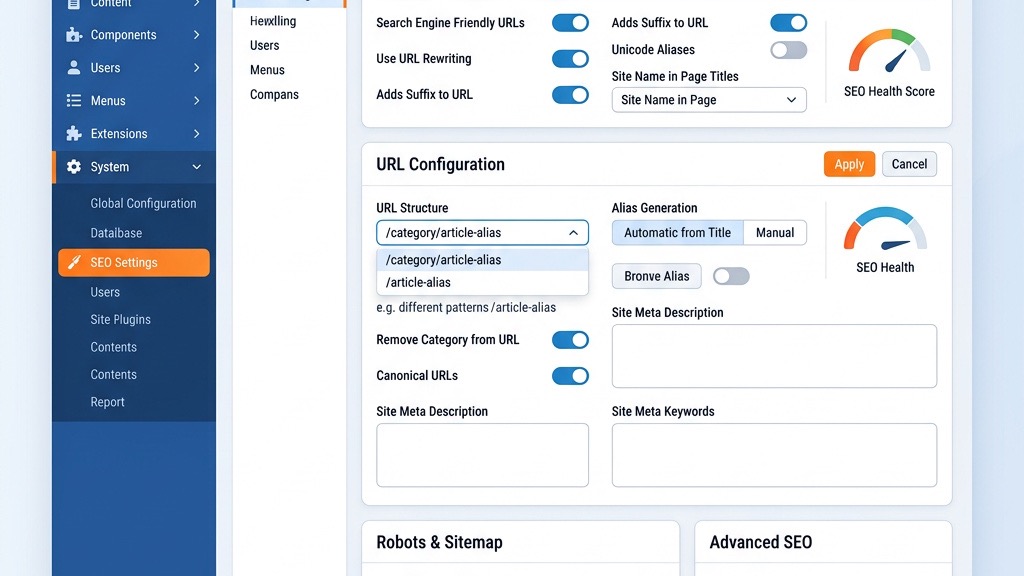
A well‑crafted URL is like a street address for a search engine; it tells the crawler exactly where to go. In Joomla we activate SEF URLs in the Global Configuration, then turn on URL Rewrite to strip the index.php segment. The result is a tidy path such as /blog/seo‑tips that reads like a headline rather than a code string.
Beyond the basic switch, we must set a trailing slash consistently—either always present or always absent—to avoid duplicate pages. Joomla’s built‑in router respects the setting, so we simply pick one style and apply it site‑wide. When we pair this with Unicode aliases, the URLs become readable in any language, expanding our reach beyond English‑only markets.
Finally, we add canonical tags to each article to signal the preferred version. This tiny line of HTML prevents search engines from splitting link equity across similar URLs. In practice, we insert the tag via the Joomla template or an SEO extension, and we verify its presence with the Coverage report in Google Search Console.
Meta titles act as the headline of a newspaper article; they must be concise, compelling, and keyword‑rich. In Joomla we edit the Meta Title field for each menu item or article, ensuring it stays under 60 characters so it displays fully in search results. The Meta Description works like a movie trailer—its role is to entice clicks while summarizing the page’s value in 150‑160 characters.
We also configure global metadata in the Template Settings, which supplies default values for pages that lack custom tags. This safety net keeps our site from publishing blank titles or descriptions. When we need to target a specific keyword, we place it near the beginning of the title, but we avoid stuffing; natural language wins the day.
Understanding how meta keywords in Joomla work helps us make informed decisions about tag usage. To keep everything organized, we maintain a spreadsheet that tracks each page’s title, description, and target keyword. This audit tool helps us spot gaps, duplicate content, and opportunities for improvement before they affect rankings.
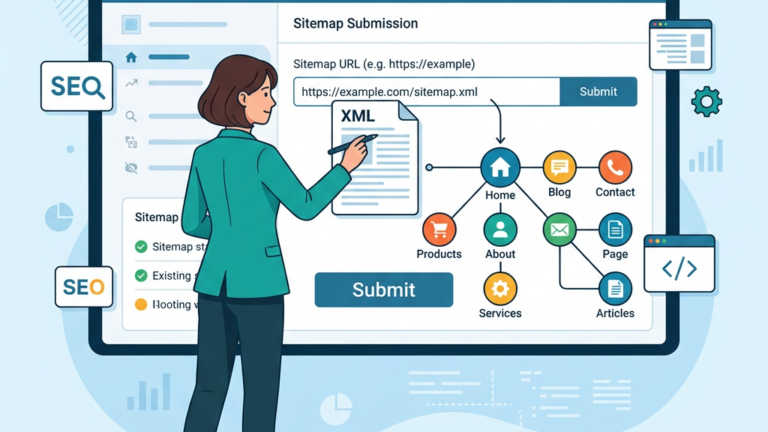
An XML sitemap is the map that guides crawlers through every corner of our site, and Joomla can generate one automatically with extensions like OSMap. After installing the extension, we configure it to include articles, categories, and custom components, while excluding duplicate or low‑value pages. The sitemap file, typically sitemap.xml, lives at the root of the domain for easy discovery.
We submit the sitemap to Google Search Console (formerly Search Central) and to Bing Webmaster Tools, then monitor the Coverage and Sitemaps reports for errors. If a page is flagged as “Submitted URL not indexed,” we investigate whether the content is thin, blocked by robots.txt, or suffering from canonical conflicts.
Our tutorial on creating a Joomla XML sitemap walks through the full setup. Regularly refreshing the sitemap—especially after bulk content updates—keeps search engines aware of new pages. We schedule a cron job that regenerates the sitemap nightly, ensuring the latest articles appear in the index within hours.
Keyword research is the compass that points us toward topics our audience is actively searching for. We start with tools such as Google Keyword Planner or Ahrefs, then group related terms into clusters that will become pillar pages and supporting articles. For each cluster we outline a hierarchy: a main article (H1) introduces the theme, while subsections (H2‑H4) dive deeper.
When we write, we embed the primary keyword in the first paragraph, in at least one subheading, and naturally throughout the copy. Supporting keywords appear in secondary headings and body text, creating a semantic web that search engines can follow. This structure mirrors a well‑organized library, where each shelf (category) holds books (articles) that belong together.
For a deeper look at these principles, check out our Joomla SEO guide. We also use breadcrumb navigation to show the path from the homepage to the current page. Breadcrumbs improve user experience and provide an additional internal linking signal for crawlers. In Joomla we enable breadcrumbs via the core module and place it above the main content area for visibility.
A solid internal linking strategy spreads link equity across the site, much like water flowing through a network of canals. We link from high‑authority pages—such as the homepage or popular blog posts—to newer or less‑visited articles. Each article includes at least three contextual links, using descriptive anchor text that reflects the destination’s topic.
Our menu structure mirrors the site’s taxonomy: top‑level items represent major categories, while dropdowns host sub‑categories and individual pages. This hierarchy not only aids navigation but also signals importance to search engines. We keep the menu depth to three levels to avoid overwhelming users and crawlers alike.
To prevent broken links, we run a periodic scan with tools like Screaming Frog, then set up 301 redirects for any URLs that have changed. Redirects preserve the original page’s ranking power and guide visitors to the correct destination without a 404 error.
Categories act as the backbone of a Joomla site, grouping content into logical sections. We assign each article to a single primary category and, when appropriate, add several tags that capture secondary themes. This dual taxonomy provides multiple pathways for users and search engines to discover related content.
When we design the taxonomy, we avoid overly granular categories that would create thin pages. Instead, we aim for a balance: enough categories to cover distinct topics, but broad enough to accumulate meaningful content under each. This approach mirrors a well‑planned garden, where each plot (category) contains enough plants (articles) to thrive.
We also expose the taxonomy through structured data using schema.org’s BlogPosting and Article types, which helps search engines understand the relationship between categories, tags, and individual posts. The markup is added via a Joomla SEO extension that injects JSON‑LD into the page header.

Site speed is the pulse of a modern website; a slow heartbeat drives visitors away. We enable GZIP compression on the server, which shrinks HTML, CSS, and JavaScript files before they travel over the network. This reduces bandwidth usage and speeds up page load times.
Joomla’s built‑in caching system stores rendered pages in the database or file system, allowing repeat visitors to receive a pre‑generated version instantly. We configure the cache to refresh every hour for dynamic pages and longer for static content. To further trim resources, we install JCH‑Optimise, a plugin that aggregates and minifies CSS/JS files, removes whitespace, and defers script execution.
Our Joomla speed optimization guide covers each technique in depth. After these optimizations, we test the site with PageSpeed Insights (via Google’s tool) and aim for a Largest Contentful Paint (LCP) under 2.5 seconds, a First Input Delay (FID) below 100 ms, and a Cumulative Layout Shift (CLS) under 0.1. These metrics constitute the Core Web Vitals that Google weighs heavily in rankings.
Images often carry the bulk of a page’s weight, so we compress them before upload. We convert photographs to WebP format, which offers up to 30 % smaller file sizes compared to JPEG while preserving visual quality. Joomla’s media manager can be configured to accept WebP uploads, or we use a server‑side conversion script.
Lazy loading delays the loading of off‑screen images until the user scrolls near them, cutting initial page size dramatically. We enable native lazy loading by adding the loading="lazy" attribute to
We also add descriptive alt attributes to every image, which serve both accessibility and SEO purposes. The alt text reads like a short caption, summarizing the visual content for users who cannot see it and for search engines that index the image.
Mobile‑first indexing means Google primarily evaluates the mobile version of a site when ranking it. We adopt a responsive design that adjusts fluidly to any screen width, using CSS media queries and flexible grid systems. Joomla templates that support Bootstrap 5 simplify this process, allowing us to define column widths that stack on smaller devices.
We test the mobile experience with the Mobile-Friendly Test (via Google’s tester) and fix any issues such as tap targets that are too close or text that is unreadably small.
Contrast is key: while desktop users enjoy rich visuals, mobile users need speed and clarity. By prioritizing essential content and hiding non‑essential elements on small screens, we keep the mobile experience lean without sacrificing functionality.
Structured data acts as a translator between our content and search engines, turning plain text into rich snippets. We embed JSON‑LD scripts that describe articles, products, FAQs, and events using schema.org vocabularies. For a blog post, we include properties such as author, datePublished, image, and articleBody.
When Google can read this markup, it may display featured snippets, star ratings, or breadcrumb trails directly in the SERP, increasing click‑through rates. We validate the markup with the Rich Results Test (via Google’s tester) to catch syntax errors before they affect rankings.
A tricolon of benefits emerges: higher visibility, better user engagement, and stronger trust signals—all without altering the visible page content.
Security is a foundation of trust; without it, search engines may demote a site. We install an SSL certificate and force all traffic to HTTPS via Joomla’s configuration and the .htaccess file. This redirects any http:// request to its secure counterpart, preserving link equity.
We also add security headers such as Content‑Security‑Policy, X‑Content‑Type‑Options, and Referrer‑Policy to protect against common attacks. These headers are set at the server level (Apache or Nginx) and do not interfere with Joomla’s functionality.
A site that is both fast and secure signals to Google that it provides a high‑quality experience, which can translate into better rankings. The contrast between a site that neglects security and one that embraces it is stark: the former risks penalties, the latter gains credibility.
The robots.txt file tells crawlers which parts of the site to ignore, helping us conserve crawl budget. We disallow the /administrator/ and /cache/ directories, while allowing the /images/ folder for image indexing. The file also references the location of the XML sitemap, giving crawlers a clear roadmap.
Duplicate content can dilute rankings, so we use canonical tags and meta robots directives to indicate the preferred version of a page. For articles that appear under multiple categories, the canonical tag points to the primary URL.
We regularly audit for duplicate content with tools like Sitebulb, fixing any issues by consolidating pages or adjusting canonical references. This disciplined approach keeps the site’s index clean and focused.
Joomla 5 introduces a modern PHP architecture, built‑in lazy loading, and improved accessibility options. The new Admin UI offers a cleaner, faster experience for managing SEO settings, making it easier to toggle SEF URLs, meta data, and schema markup.
A notable addition is the AI‑assisted content analyzer, which suggests keyword placements and readability improvements based on machine‑learning models. This tool acts like a seasoned editor, guiding us toward content that satisfies both users and search engines.
Joomla 5 also supports HTTP/2 and HTTP/3 out of the box, enhancing connection speed and reducing latency—critical factors for Core Web Vitals.
| Feature | OSMap | sh SEO | JCH‑Optimise | shCE Editor |
|---|---|---|---|---|
| Sitemap generation | ✔️ | ✔️ | ❌ | ❌ |
| Schema markup wizard | ❌ | ✔️ | ❌ | ❌ |
| CSS/JS minification | ❌ | ❌ | ✔️ | ❌ |
| Meta tag management | ✔️ | ✔️ | ❌ | ✔️ |
| AI content suggestions | ❌ | ✔️ (2026 update) | ❌ | ❌ |
| Compatibility with Joomla 5 | ✔️ | ✔️ | ✔️ | ✔️ |
Our guide to the best Joomla SEO extensions covers each tool in detail. We recommend pairing OSMap for sitemap creation, Sh404SEF for advanced URL handling and schema, and JCH‑Optimise for performance. The JCE Editor helps us embed alt tags and lazy‑loading attributes directly while writing articles.
By following these steps, we create a cohesive SEO ecosystem that works in harmony, much like a well‑tuned orchestra.
We begin by adding our Joomla site to Google Search Console through the verification process, which typically involves uploading an HTML file or adding a DNS record. Once the property is verified, we can submit our sitemap directly from the Joomla backend, giving Google a clear map of our content structure. This initial setup lets us receive regular updates about how Google sees each page, which is essential for ongoing optimization.
The indexing dashboard shows us which URLs are live, which are pending, and which have been excluded for various reasons. By reviewing the “Coverage” report, we spot patterns such as soft 404s or blocked resources that could affect visibility. We also explore the “Performance” tab to see the most frequent search queries, click‑through rates, and average positions, allowing us to prioritize high‑impact keywords.
When crawl errors appear, we address them in a systematic way:
By following these steps, we keep our site health in check and reduce the risk of ranking drops caused by technical issues.
We recognize that search engines reward pages that stay relevant, so we schedule regular reviews of older articles to add new data, adjust headings, and improve internal linking. Refreshing content not only boosts rankings but also enhances user satisfaction, as visitors receive up‑to‑date information. In 2026, the pace of change in many niches makes this practice more crucial than ever.
Joomla’s built‑in versioning system gives us a safe way to edit articles while preserving previous drafts, which helps us track changes over time. We set up a quarterly audit calendar, assigning each team member a batch of URLs to evaluate for accuracy, keyword relevance, and multimedia updates. During the audit, we flag pages that need a complete rewrite versus those that only require minor tweaks.
Checklist for a successful content refresh:
Q1: Do I need to enable SEF URLs on every Joomla site?
A1: Yes, turning on SEF URLs removes the index.php segment and creates clean, readable links that both users and crawlers prefer.
Q2: How often should I regenerate my XML sitemap?
A2: After any major content change—new articles, deleted pages, or URL updates—we should regenerate the sitemap and resubmit it to Search Console.
Q3: Is HTTPS mandatory for SEO in 2026?
A3: While not a direct ranking factor, HTTPS is a trust signal; browsers display a “Not Secure” warning for HTTP pages, which can deter visitors and affect dwell time.
Q4: Which Joomla extension gives the best image optimization?
A4: JCH‑Optimise handles CSS/JS minification, but for images we rely on server‑side tools like ImageMagick combined with Joomla’s media manager to convert files to WebP.
Q5: Can I use AI tools to write meta descriptions?
A5: Absolutely. The AI assistant in Sh404SEF can generate concise, keyword‑rich meta descriptions that align with the page content, saving time while maintaining quality.