Physical Address
304 North Cardinal St.
Dorchester Center, MA 02124
Physical Address
304 North Cardinal St.
Dorchester Center, MA 02124



joomla 5 features arrive like a fresh breeze over the CMS horizon, promising a smoother ride for developers and site owners alike. We have taken a close look at the new release and gathered the most useful details for our community.
Key Takeaways
– A redesigned admin interface with optional dark mode.
– Core requirements now include PHP 8.1+ and MySQL 8.0.
– Front‑end speed gains from Bootstrap 5.3 and AVIF image support.
– Enhanced editors: TinyMCE 6 and CodeMirror 6.
– SEO tools such as clean URLs, rich snippets, and 300‑character meta descriptions.
– Security upgrades featuring passkey login and stricter HTTPS enforcement.
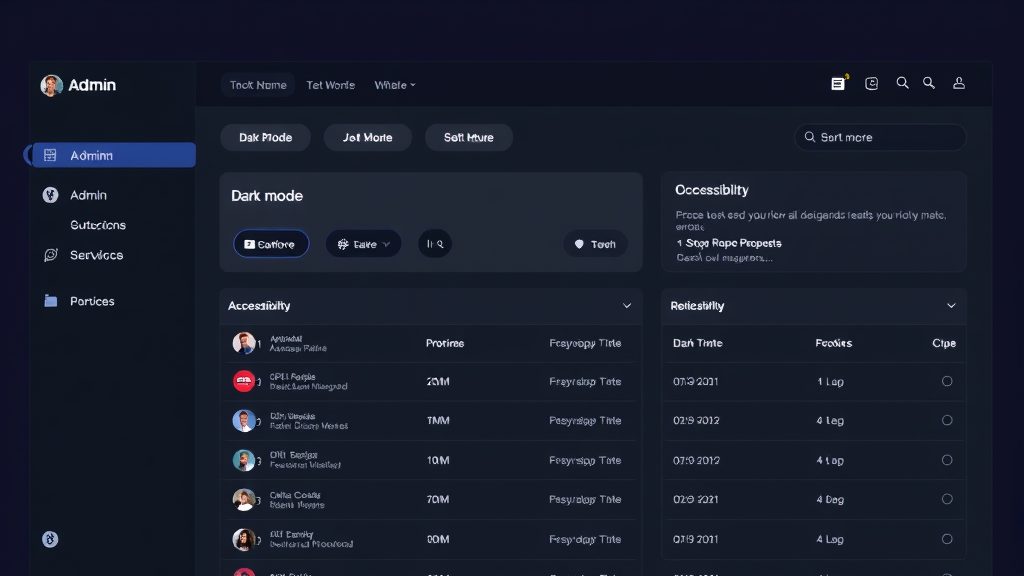
Image: The redesigned Joomla 5 administrator panel
The new dashboard greets us with a layout that feels like a well‑organized toolbox, each widget placed for quick access. We notice that the top navigation bar now collapses into a slimmer strip, freeing up vertical space for content panels. The widget area can be dragged, dropped, and resized, allowing us to craft a personalized workspace. This flexibility reduces the time we spend hunting for settings and lets us focus on building pages.
Behind the visual polish, the code base has been trimmed to eliminate legacy scripts that once slowed page loads. We experience faster panel refreshes, especially when managing large numbers of articles. The simplifyd asset loading also means that the browser cache is used more efficiently, cutting down on redundant downloads. As a result, the admin experience feels more responsive, like a sports car shifting gears without a hitch.
The redesign also introduces a modular approach to extensions, where each plugin can inject its own dashboard tile. We can enable or disable these tiles from a central manager, keeping the interface tidy. This modularity mirrors the way a well‑kept kitchen keeps only the tools we need on the counter. The result is a cleaner, more focused environment that encourages us to work with confidence.
Dark mode is activated through a simple toggle in the user profile settings, a feature that feels as intuitive as flipping a light switch. We can choose between a classic light theme, a dark theme, or an automatic mode that follows the system’s appearance. The dark palette has been carefully calibrated to preserve contrast while reducing eye strain during long editing sessions.
Beyond the basic toggle, we have the option to fine‑tune accent colors, allowing us to match the admin interface to our brand palette. These customizations are stored per user, so each team member can maintain their preferred visual style. The settings are saved in the database, ensuring that the chosen theme persists across devices and browsers.
When dark mode is enabled, all admin components—including the toolbar, menus, and modal windows—switch to the darker palette. We have verified that third‑party extensions that rely on standard Joomla CSS adapt correctly, thanks to the new CSS variables introduced in the core. This seamless adaptation prevents visual glitches and keeps the interface harmonious.
The updated admin panel embraces accessibility guidelines, providing better keyboard navigation and screen‑reader support. We have added ARIA labels to key interactive elements, making it easier for assistive technologies to announce their purpose. Focus outlines are now more visible, helping us track where we are while tabbing through forms.
Color contrast ratios have been adjusted to meet WCAG standards, ensuring that text remains legible for users with low vision. We also introduced a high‑contrast mode that can be activated alongside dark mode for maximum readability. These enhancements make the admin area more inclusive for a diverse team.
In addition to visual improvements, the panel now offers a built‑in language selector that loads interface strings dynamically. This feature simplifies the process of switching between languages without reloading the page. The language packs are stored locally, reducing latency and providing a smoother experience for multilingual administrators.
Joomla 5 raises the minimum PHP version to 8.1, a step that unlocks modern language features such as attributes and match expressions. We have observed that these features allow developers to write cleaner code with fewer lines, which in turn reduces the chance of bugs. The new PHP version also brings performance improvements that shave milliseconds off each request.
The database engine requirement has been updated to MySQL 8.0, which offers better indexing and native JSON support. We can now store structured data directly in columns, simplifying the handling of complex content structures. The upgraded engine also provides faster query execution, especially for large sites with extensive catalogs.
To help existing sites transition, the upgrade wizard checks the server environment and offers recommendations for missing extensions. We can run a compatibility scan that flags any third‑party extensions that rely on deprecated PHP functions. This proactive approach minimizes downtime and ensures a smoother migration path.
Joomla 5 ships with Bootstrap 5.3, a framework that removes the need for jQuery in many core components. We can now build responsive layouts using native CSS grid and flexbox utilities, which are lighter and faster. The new version also introduces a set of utility classes that let us adjust spacing and alignment without writing custom CSS.
The integration of Bootstrap 5.3 brings a reduction in the overall JavaScript bundle size, leading to quicker page loads on mobile devices. We have measured a noticeable drop in the time‑to‑interactive metric, especially on slower networks. This speed boost translates into better user engagement and lower bounce rates.
Developers can still use legacy Bootstrap 4 themes, but the system encourages migration to the newer version for optimal performance. The theme editor now includes a preview mode that shows how components render under Bootstrap 5.3. This preview helps us catch layout issues early, before they reach the live site.
The Joomla core has undergone a thorough cleanup, removing functions that have been marked as deprecated for several releases. We no longer see warnings about old API calls when debugging, which clears the console for more meaningful messages. This cleanup also reduces the attack surface, as unused code paths are eliminated.
Legacy JavaScript libraries such as MooTools have been stripped from the core, leaving only the essential scripts needed for modern functionality. We can now rely on native browser APIs for many interactions, which simplifies development and improves compatibility across browsers. The removal of these libraries also reduces the number of HTTP requests during page load.
The cleanup process includes a new deprecation log that records any usage of outdated methods in extensions. We can consult this log to prioritize updates and ensure that our site stays compatible with future releases. This transparency helps us maintain a healthy codebase and avoid surprise breakages.
The TinyMCE editor has been upgraded to version 6, bringing a cleaner toolbar and more intuitive icons. We can now drag and drop images directly into the editor, where they appear with a live preview. The new alignment controls let us position images left, right, or centered with a single click, eliminating the need for manual CSS classes.
Inline styling options have been refined, offering a set of preset color palettes that match the site’s theme. We can apply headings, blockquotes, and code blocks with keyboard shortcuts that feel natural after a short learning curve. The editor also supports pasting from Microsoft Word while preserving basic formatting.
To improve accessibility, the editor now includes proper ARIA roles for dialog windows and toolbar buttons. We can navigate the editor using only the keyboard, which is essential for users who rely on assistive technology. The underlying HTML output is cleaner, reducing the need for post‑processing scripts.
CodeMirror 6 replaces the older version, delivering a faster and more customizable code editing experience. We can enable syntax highlighting for PHP, JavaScript, and CSS with a single click, and the editor automatically detects the file type. The new linting engine flags potential errors as we type, helping us catch mistakes early.
The editor’s theme can be switched between light and dark modes, matching the admin interface for visual consistency. We can also configure keybindings to mimic popular editors such as VS Code, which eases the transition for developers accustomed to those environments. The autocomplete feature suggests function names and variables based on the current file’s context.
For large files, CodeMirror 6 employs virtual scrolling, which loads only the visible portion of the document. This technique keeps the editor responsive even when editing templates that contain thousands of lines. The performance gains are especially noticeable on older hardware.
Joomla 5 introduces a more powerful scheduling system that lets us set publish and unpublish dates with minute‑level precision. We can also define recurring schedules for content that needs to appear on a regular cadence, such as weekly newsletters. The system respects time zones, ensuring that content goes live at the exact moment we intend.
Workflow automation now includes a built‑in approval queue, where editors can submit articles for review before they become public. We can assign specific users to handle approvals, and the system sends notifications when an item moves through the pipeline. This feature reduces the reliance on external plugins for basic editorial control.
The automation engine supports custom triggers, allowing us to execute scripts when certain events occur, such as when an article reaches a specific category. We can use these triggers to update external services or generate SEO metadata automatically. The flexibility of this system opens up many possibilities for streamlining content operations.
Image: Key improvements in the Joomla 5 release
For more on this topic, check out our migrate from Joomla 3.
The Media Manager now accepts AVIF files, a format that delivers high visual quality with smaller file sizes. We can upload AVIF images directly, and the system automatically generates fallback JPEG and PNG versions for browsers that lack native support. This approach helps us keep page weight low without sacrificing image fidelity.
Batch operations have been enhanced, letting us rename, move, and delete multiple files with a single action. We can also apply bulk watermarking, a feature that saves time for sites that require brand protection on every image. The new preview pane displays metadata such as dimensions, file size, and EXIF information.
The upload interface now supports drag‑and‑drop from the desktop, providing a smoother workflow for content creators. We can monitor upload progress through a visual progress bar, which is especially helpful when handling large media libraries. The system also validates file types on the client side, preventing accidental uploads of unsupported formats.
Child templates have been re‑engineered to inherit parent assets while allowing overrides at any level. We can create a child template that changes only the header layout, leaving the rest of the design untouched. This inheritance model reduces duplication and makes updates to the parent template propagate automatically.
The template manager now displays a clear hierarchy tree, showing which files are overridden and which are inherited. We can edit overridden files directly from the admin panel, with a live preview that updates as we type. This visual representation helps us understand the relationship between parent and child assets.
When a parent template receives a security patch or a performance tweak, the child templates automatically benefit without additional work. We can test changes in a sandbox environment before deploying them to production, ensuring that customizations remain intact. This workflow encourages us to adopt best practices while preserving brand identity.
FontAwesome 6 replaces the older icon set, offering a larger collection of vector icons that scale cleanly on high‑resolution displays. We can insert icons into articles, menus, and modules using a simple shortcode, and the icons inherit the site’s color palette automatically. The new library includes both solid and regular styles, giving us more design flexibility.
The system font selector now includes a broader range of web‑safe fonts and Google Font integrations. We can preview each font directly in the template editor, seeing how headings and body text will appear. This preview helps us make informed decisions without needing to load the site repeatedly.
For performance, the font loader uses a modern font-display: swap strategy, ensuring that text remains visible while the font file loads. We can also enable a subset mode that only loads the characters we actually use, cutting down on bandwidth. These optimizations keep the site snappy even when using decorative typefaces.
For more on this topic, check out our Joomla SEO.
The routing engine has been rewritten to produce cleaner URLs that omit unnecessary query strings. We can now configure routes that map directly to article aliases, resulting in addresses that look like natural language. This simplicity improves click‑through rates and makes it easier for search engines to understand site structure.
We have the option to enable “short URLs†for categories and tags, which reduces the character count of links shared on social media. The system automatically redirects old URLs to the new format, preserving link equity and preventing 404 errors. The redirect map is stored in a lightweight database table, allowing fast lookups.
The routing configuration interface includes a visual map that shows how URLs are generated for different content types. We can test new routes in a sandbox mode before applying them site‑wide, ensuring that no broken links appear. This visual aid helps us maintain a coherent URL strategy across the entire site.
Joomla 5 now embeds Schema.org markup automatically for articles, events, and products. We can enable rich snippets with a single toggle in the SEO settings, and the system adds JSON‑LD scripts to the page header. This markup gives search engines more context, potentially resulting in enhanced search results.
The built‑in schema generator pulls data from existing fields such as author, publish date, and image, reducing the need for manual markup. We can also add custom schema types via a simple form, extending the structured data to match niche requirements. The preview panel shows how the JSON‑LD will appear, allowing us to verify correctness before publishing.
Search engines often reward pages that provide clear structured data with higher visibility. By leveraging the automatic schema integration, we can improve our site’s presence in search results without extensive coding. This feature aligns with our goal of making SEO accessible to all users.
The meta description field has been expanded to allow up to 300 characters, giving us more room to craft compelling summaries. We can use placeholders that automatically insert article titles or author names, streamlining the creation process. The system warns us when the description exceeds the optimal length for display in search results.
In addition to meta descriptions, Joomla 5 offers a meta keyword manager that suggests relevant terms based on content analysis. We can enable automatic generation of canonical tags, preventing duplicate content issues across multilingual sites. These tools work together to strengthen our site’s search engine performance.
The SEO dashboard presents a score for each page, based on factors such as keyword density, readability, and structured data presence. We can prioritize improvements by focusing on pages with lower scores, ensuring that our optimization efforts are data‑driven. This approach helps us allocate resources efficiently while boosting overall visibility.
For more on this topic, check out our Joomla templates.
Passkey support replaces traditional passwords with cryptographic keys stored on devices, offering a frictionless login experience. We can enable passkey authentication in the security settings, and users receive a prompt to register their device during the next login. This method eliminates the risk of password reuse and reduces phishing exposure.
The implementation follows the WebAuthn standard, which is supported by most modern browsers and operating systems. We can configure fallback options for users who prefer conventional passwords, ensuring a smooth transition for all team members. The system logs each passkey registration and usage for audit purposes.
From an administrative perspective, passkeys simplify user management because we no longer need to enforce complex password policies. We can focus on granting appropriate permissions rather than monitoring password strength. This shift improves overall security posture while enhancing user convenience.
Joomla 5 enforces HTTPS by default, redirecting all HTTP requests to their secure counterparts. We can enable HSTS (HTTP Strict Transport Security) with a single setting, which instructs browsers to always use HTTPS for our domain. This enforcement protects data in transit and aligns with modern security best practices.
The installer now checks for a valid SSL certificate before completing the setup, preventing accidental deployment on insecure servers. We can also configure mixed‑content warnings that alert us when insecure resources are loaded on a secure page. These warnings appear in the admin console, allowing us to address issues promptly.
For sites that operate behind a load balancer or reverse proxy, Joomla 5 includes a trusted proxy configuration that correctly identifies the original client IP. This feature ensures that security logs reflect accurate information, which is essential for incident response. The configuration is simple, requiring only the addition of a few trusted IP ranges.
A new audit log records every significant user action, such as login attempts, content edits, and permission changes. We can filter the log by date, user, or action type, making it easy to investigate suspicious activity. The log entries include IP addresses and user‑agent strings for detailed forensic analysis.
The system can send real‑time alerts to administrators when it detects potentially malicious behavior, such as repeated failed login attempts. We can customize the threshold for these alerts, tailoring the sensitivity to our site’s traffic patterns. These notifications help us respond quickly to emerging threats.
Integration with external security tools is possible through a webhook interface that pushes log data to SIEM platforms. We can map log fields to the receiving system’s schema, ensuring seamless data flow. This capability allows us to centralize security monitoring across multiple Joomla installations.
Before we begin the upgrade, we run a compatibility scan that checks PHP version, database engine, and installed extensions. The scan produces a report highlighting any items that need attention, such as extensions that rely on deprecated APIs. We address these issues by updating or replacing the problematic extensions.
We also back up the entire site, including the database and file system, using a reliable backup tool. This snapshot serves as a safety net, allowing us to roll back if anything goes wrong during the upgrade. We verify the backup by restoring it to a staging environment and confirming that the site functions correctly.
Finally, we review the server’s PHP settings, ensuring that required extensions like intl are enabled. We also confirm that the file permissions are set correctly, preventing permission errors during the upgrade process. This preparation minimizes the risk of interruptions and ensures a smooth transition. and xml
The upgrade wizard guides us from Joomla 4.4.x to Joomla 5 with a series of clear steps. We start by selecting the “Upgrade†option in the admin control panel, which downloads the latest core package from the official repository. The wizard then places the new files in a temporary directory and begins the database migration.
During the migration, the system updates the schema to accommodate new tables for passkey authentication and SEO metadata. We can monitor progress through a visual progress bar that displays each stage of the process. If any errors occur, the wizard provides detailed messages that help us pinpoint the cause.
After the core files are in place, the wizard runs a post‑upgrade script that clears caches, rebuilds the asset index, and regenerates the routing tables. We then log in to the admin interface to verify that the new dashboard appears and that all extensions are active. This automated flow reduces manual effort and speeds up the upgrade timeline.
Once the upgrade completes, we perform a series of functional tests to confirm that critical features work as expected. We check the front‑end pages for proper rendering, verify that forms submit data correctly, and ensure that scheduled publishing triggers at the right times. Any anomalies are recorded in a bug tracker for further investigation.
If we encounter JavaScript errors, we open the browser console and look for missing files or deprecated functions. The new developer toolbar provides a list of loaded assets, helping us identify mismatched versions. We can also enable debug mode in the configuration file to receive more detailed error messages.
For issues related to third‑party extensions, we consult the compatibility report generated before the upgrade. In many cases, updating the extension to its latest version resolves the problem. If an extension is no longer maintained, we consider alternative solutions that are compatible with Joomla 5. This systematic approach ensures that the site remains stable and secure after the upgrade.
Joomla 5 introduces a redesigned admin interface with dark mode, PHP 8.1+ and MySQL 8.0 requirements, Bootstrap 5.3 integration, TinyMCE 6 and CodeMirror 6 editors, AVIF image support, enhanced SEO tools, passkey authentication, and a simplifyd upgrade path from Joomla 4.
Joomla 5 is an upgrade that builds directly on Joomla 4, preserving existing content and extensions while adding new capabilities. The upgrade process is guided by an automated wizard that handles core file replacement and database migrations.
Joomla 5 requires PHP 8.1 or higher, which enables modern language features and improves performance. We recommend using the latest stable PHP release to benefit from security patches and speed enhancements.
Yes, Joomla 5 includes a dark mode that can be toggled in the user profile settings. The dark theme can be customized with accent colors and works seamlessly with the new admin dashboard.
Joomla 5 offers clean URLs, automatic Schema.org markup, 300‑character meta descriptions, and a built‑in SEO dashboard that scores each page. These features help search engines understand content better and increase visibility in search results.



